
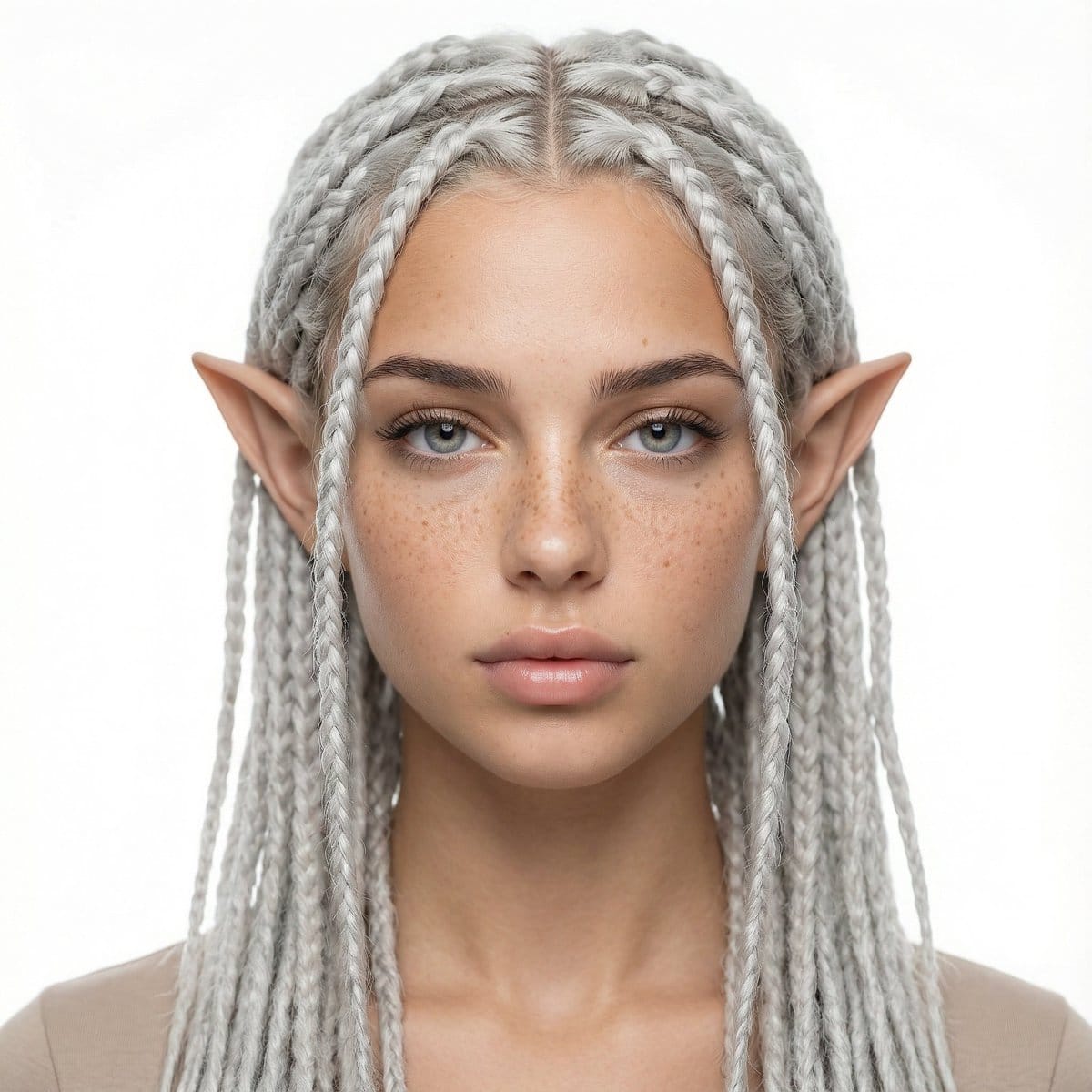
Avatar Girl Studio Portrait Transformation Prompt

A detailed JSON prompt for generating a photorealistic studio portrait of a woman, transforming her human ears into elegant fantasy avatar ears while strictly locking her identity, skin texture, and facial proportions based on a reference image.

Example Prompt
{ "JOB_TYPE": "image_generation", "LANGUAGE": "en", "REFERENCE_IMAGES": { "REF_1_SUBJECT_IDENTITY": "Use the FIRST reference image as the ONLY source for the woman's identity (face, skin texture, freckles, eye area, nose, lips, jawline, proportions). Keep her identity unchanged.", "REF_2_OPTIONAL": "If a second reference is used, it is ONLY for mood/lighting. Do not change identity." }, "LOCKS": { "IDENTITY_LOCK": "The woman’s identity MUST match REF_1 exactly. Do not change age, ethnicity, facial structure, freckles pattern, eye shape, nose, lips, or skin texture.", "STUDIO_LOCK": "Must look like a professional studio portrait with a pure white seamless background.", "FRAMING_LOCK": "Waist-up portrait. Head fully visible. Centered composition." }, "SCENE": { "SETTING": "professional photo studio", "BACKGROUND": "pure white seamless backdrop, clean and shadow-minimized", "LIGHTING": "softbox key light + gentle fill, high-key studio lighting, even exposure, soft shadows", "CAMERA": { "SHOT_TYPE": "waist-up portrait", "ANGLE": "eye-level", "LENS_LOOK": "portrait lens look, natural perspective, sharp focus on eyes", "QUALITY": "ultra high resolution, crisp details, natural skin texture" } }, "SUBJECT": { "POSE": "neutral relaxed posture, shoulders natural, head slightly tilted if needed, calm confident expression", "GAZE": "looking into the camera", "CLOTHING": "simple minimal top (neutral tone), no logos, studio-appropriate" }, "TRANSFORMATIONS": { "AVATAR_EARS": { "DESCRIPTION": "Replace human ears with elegant fantasy avatar ears: elongated, slightly pointed, smooth organic shape, natural attachment to the head, realistic skin blending and shading, symmetrical, proportional to the face." }, "HAIR": { "COLOR": "{argument name="hair color" default="near-white silver gray (very light), cool-toned"}", "STYLE": "neatly done rasta braids (dreadlock braids), thin-to-medium thickness, clean scalp parting lines, tidy edges, professional braiding, consistent braid length, natural fall around head and shoulders", "DETAILS": "high strand definition, no frizz, realistic fiber texture" } }, "RENDERING_STYLE": { "LOOK": "photorealistic studio portrait with subtle fantasy features", "SKIN": "keep natural pores and freckles, no plastic skin, no over-smoothing", "COLOR_GRADING": "clean neutral, high-key studio tones" }, "NEGATIVE_PROMPT": [ "different person", "face changed", "extra ears", "deformed ears", "asymmetrical ears", "blurry", "low resolution", "cartoon", "anime", "over-smooth skin", "heavy makeup", "harsh shadows", "colored background", "busy background", "text", "watermark", "logo", "cropped head", "out of frame" ], "OUTPUT": { "ASPECT_RATIO": "1:1", "STYLE_STRENGTH": "medium", "REA
Generate with AI
AI Model
Nano-banana-pro
Author

Frequently Asked Questions

Everything you need to know about character style prompts

How do I use this character style prompt?

Simply click the "Generate with AI" button above, and you'll be taken to our AI image generator with this Character Style prompt pre-filled. You can customize it further or generate images directly. Our AI will interpret the prompt and create stunning character visuals based on your description.

Can I modify this prompt for my specific needs?

Absolutely! Feel free to copy the prompt and customize it to match your vision. For character artwork, try adding details about style, lighting, composition, or mood. The more descriptive you are, the better the AI can understand your creative vision. Browse our character prompts to learn more techniques.

What AI models work best for character style?

This character prompt works with most modern AI image generators including Nano Banana, Flux, and GPT-Image. Different models excel at different aspects - Nano Banana is great for character styles, while Flux offers photorealistic results.

What makes a good character style prompt?

Great character prompts include: specific subject details, art style references, lighting conditions (soft light, dramatic shadows), color palette, mood/atmosphere, and technical specs (4K, detailed, HD). Study our example prompts to see effective patterns.

Is this prompt free to use?

Yes! All prompts in our library are completely free for personal and commercial use. Copy, modify, and create amazing character artwork without any restrictions.

More Prompts ➜
Infographic from pasted text - AI Image Prompt
Infographic from pasted text
This prompt turns a block of text, such as a summary, into a clean infographic layout.
by Mentis ??
Every meme character in Where’s Wally style - AI Image Prompt
Every meme character in Where’s Wally style
Creates a chaotic poster featuring every known meme character illustrated in a dense Where’s Wally search-and-find style.
by Higgsfield AI ?
Ultra-realistic photo from retro game interface - AI Image Prompt
Ultra-realistic photo from retro game interface
An English prompt instructing Nano Banana Pro to turn a retro game interface into an ultra-realistic 1990s-style family photo, removing UI and retelling the scene as if it happened in real life.
by Stas Kulesh
Add dialogue to a manga based on its content - AI Image Prompt
Add dialogue to a manga based on its content
A prompt that instructs the model to infer the story from a manga without dialogue and insert appropriate speech into the panels.
by 野火 城@AI漫画
90s-style film portrait from a reference photo - AI Image Prompt
90s-style film portrait from a reference photo
A long, detailed prompt to turn a reference photo of a man into a warm, grainy 1990s film-style portrait in a cozy indoor setting.
by Johnn
Image Editing: Car and Background Transformation - AI Image Prompt
Image Editing: Car and Background Transformation
A simple editing prompt used to test the model's precise editing capabilities by instructing it to change the car in an existing image to a Tesla and replace the trees in the background with tall skyscrapers.
by Artificial Analysis

Ready to Create Amazing Images?

Start generating stunning AI images with this prompt or explore our extensive prompt library for more inspiration.

Generate Now Browse All Prompts



