
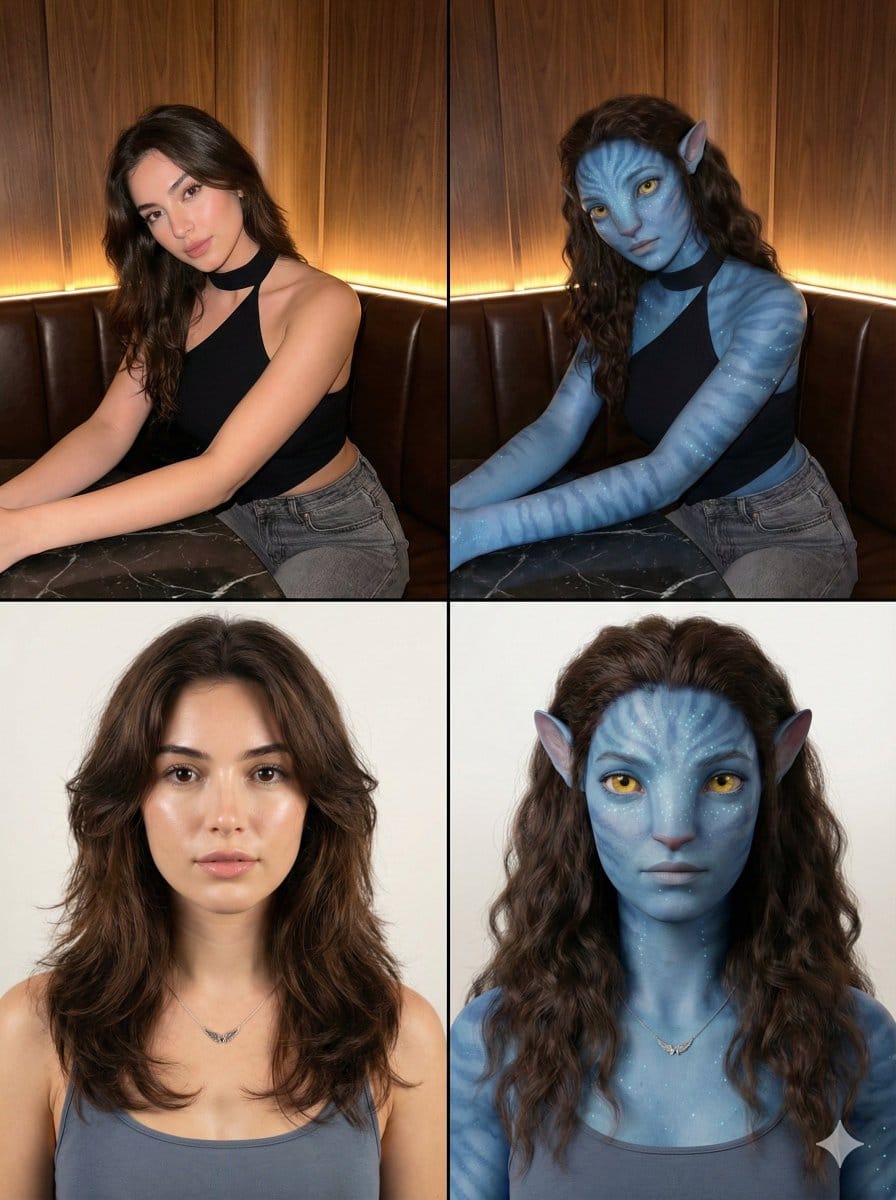
2x2 Grid Human-to-Na'vi Transformation Prompt - AI Generated Realistic Style Image
Generate Similar Image

This prompt is optimized for Nano-banana-pro model

2x2 Grid Human-to-Na'vi Transformation Prompt

A structured JSON prompt designed to generate a 2x2 grid image demonstrating a transformation effect. The grid alternates between a photorealistic human subject and her CGI/Digital Art conversion into a Na'vi/Avatar hybrid, maintaining consistency in pose

Example Prompt
{   "image_layout": {     "type": "2x2 Grid",  Transformation",     "style": "Photorealistic to CGI/Digital Art conversion"   },   "panels": [     {       "position": "Top-Left",       "subject_type": "Human Female",       "setting": "Indoor Restaurant/Bar Booth",       "lighting": "Warm ambient strip lighting from behind, soft frontal illumination",       "subject_details": {         "hair": "Long, dark brown, wavy, side-swept",         "skin": "Fair, smooth complexion",         "eyes": "Dark brown, almond-shaped",         "apparel": {           "top": "{argument name=\"top apparel\" default=\"Black asymmetrical halter-neck top (one shoulder exposed)\"}",           "bottom": "Grey denim jeans"         },         "pose": "Seated, leaning forward slightly, arms resting on a dark marble table",         "expression": "Soft, alluring, head slightly tilted"       },       "background": "Wood paneling with horizontal grain, dark leather booth seating"     },     {       "position": "Top-Right",       "subject_type": "Na'vi / Avatar Hybrid",       "setting": "Indoor Restaurant/Bar Booth (Same as Top-Left)",       "lighting": "Warm ambient strip lighting matches original, skin reflects blue tones",       "subject_details": {         "hair": "Long, dark brown, wavy (same as original)",         "skin": "Blue textured skin, faint darker blue stripes on arms and face, bioluminescent white dots",         "eyes": "Large, yellow irises, feline pupil shape",         "ears": "Pointed, elven/Na'vi style",         "nose": "Broad, flat feline bridge",         "apparel": "Black asymmetrical halter-neck top, grey denim jeans",         "pose": "Seated, leaning forward (matches original)",         "expression": "Soft, alluring (matches original)"       },       "background": "Wood paneling and dark leather booth (matches original)"     },     {       "position": "Bottom-Left",       "subject_type": "Human Female",       "setting": "Studio Portrait",       "lighting": "Soft, even studio lighting, neutral background",       "subject_details": {         "hair": "Dark brown, voluminous, center-parted, layered",         "skin": "Fair, dewy finish",         "eyes": "Dark, direct gaze",         "apparel": {           "top": "Greyish-blue tank top/camisole",           "accessory": "Delicate silver necklace with a wing-shaped pendant"         },         "pose": "Front-facing bust shot",         "expression": "Neutral, calm, lips slightly parted"       },       "background": "Plain off-white/light grey gradient"     },     {       "position": "Bottom-Right",       "subject_type": "Na'vi / Avatar Hybrid",       "setting": "Studio Portrait (Same as Bottom-Left)",       "lighting": "Soft studio lighting (matches original)",       "subject_details": {         "hair": "Dark brown, voluminous, center-parted (same as original)",         "skin": "Blue, smooth texture with subtle speckling/bioluminescence patterns on cheeks and forehead",         "eyes": "Large, bright yellow/amber",         "ea": "Pointed, elven/Na'vi style"       }     }   ] }
Generate with AI

Pro Tip:

This realistic style prompt has been tested and optimized for best results. You can modify it slightly to customize the output while keeping the core structure intact.

AI Model
Nano-banana-pro
Author
Lex
Category
Realistic Style

Frequently Asked Questions

Everything you need to know about realistic style prompts

How do I use this realistic style prompt?

Simply click the "Generate with AI" button above, and you'll be taken to our AI image generator with this Realistic Style prompt pre-filled. You can customize it further or generate images directly. Our AI will interpret the prompt and create stunning realistic visuals based on your description.

Can I modify this prompt for my specific needs?

Absolutely! Feel free to copy the prompt and customize it to match your vision. For realistic artwork, try adding details about style, lighting, composition, or mood. The more descriptive you are, the better the AI can understand your creative vision. Browse our realistic prompts to learn more techniques.

What AI models work best for realistic style?

This realistic prompt works with most modern AI image generators including Nano Banana, Flux, and GPT-Image. Different models excel at different aspects - Nano Banana is great for realistic styles, while Flux offers photorealistic results.

What makes a good realistic style prompt?

Great realistic prompts include: specific subject details, art style references, lighting conditions (soft light, dramatic shadows), color palette, mood/atmosphere, and technical specs (4K, detailed, HD). Study our example prompts to see effective patterns.

Is this prompt free to use?

Yes! All prompts in our library are completely free for personal and commercial use. Copy, modify, and create amazing realistic artwork without any restrictions.

Ready to Create Amazing Images?

Start generating stunning AI images with this prompt or explore our extensive prompt library for more inspiration.



