
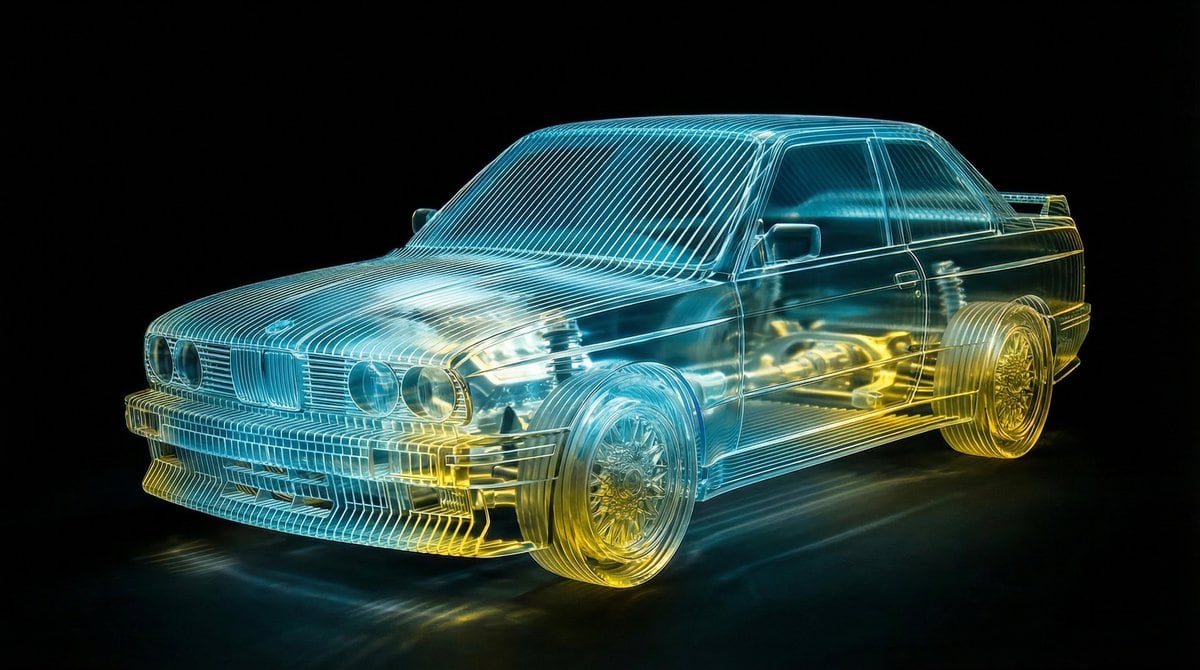
Transparent Layered Glass Supercar Sculpture Prompt

A highly technical JSON prompt for generating a photorealistic, ray-traced image of a supercar. The car is rendered as a topological sliced sculpture made of layered optical grade acrylic glass, with internal mechanical details visible. The prompt emphasi

예시 프롬프트
{ "prompt_configuration": { "parameters": { "car_model": "{argument name="car model" default="SUPERCAR MODEL"}", "material_color": "{argument name="material color" default="warm amber and deep orange"}" }, "aspect_ratio": "16:9" "viewpoint": "front 3/4 angle, full vehicle visibility" }, "prompt_payload": { "subject_definition": { "core_subject": "{car_model}", "representation_style": "topological sliced sculpture, constructed from parallel stacked sheets of translucent material" }, "material_physics": { "medium": "layered optical grade acrylic glass", "texture": "laser-cut edges, volumetric transparency, subsurface scattering", "color_palette": "translucent {material_color} gradient, glowing internal refraction" }, "technical_details": { "structure": "ribbed laminar structure, cross-section planes, internal mechanical details visible through layers (engine block, suspension, transmission)", "fidelity": "hyper-detailed, CAD-like precision, exploded view aesthetic but assembled" }, "lighting_and_atmosphere": { "environment": "pitch black void background, infinite dark studio", "lighting_setup": "rim lighting to catch glass edges, internal volumetric glow, caustics, cinematic high contrast" }, "rendering_engine": { "style": "Octane Render, raytracing, 8k resolution, photorealistic material properties, macro photography depth of field" } }, "negative_prompt": [ "solid metal body", "opaque paint", "cartoon", "illustration", "distorted wheels", "cropped frame", "daylight", "reflection of photographer" ] }
AI로 생성하기
AI 모델
Nano-banana-pro
제작자

자주 묻는 질문

realistic style 프롬프트에 대해 알아야 할 모든 것

이 realistic style 프롬프트는 어떻게 사용하나요?

위의 "AI로 생성하기" 버튼을 클릭하기만 하면 이 Realistic Style 프롬프트가 미리 입력된 AI 이미지 생성기로 이동합니다. 추가로 맞춤 설정하거나 바로 이미지를 생성할 수 있습니다. AI가 프롬프트를 해석하고 사용자의 설명에 따라 놀라운 realistic 비주얼을 만들어냅니다.

이 프롬프트를 특정 요구에 맞게 수정할 수 있나요?

물론입니다! 프롬프트를 복사하여 원하는 대로 자유롭게 맞춤 설정하세요. realistic 아트웍의 경우 스타일, 조명, 구도, 분위기 등에 대한 세부 정보를 추가해 보세요. 설명이 구체적일수록 AI가 창의적인 비전을 더 잘 이해할 수 있습니다. 더 많은 기술을 배우려면 realistic 프롬프트를 살펴보세요.

realistic style에 가장 적합한 AI 모델은 무엇인가요?

이 realistic 프롬프트는 Nano Banana, Flux, GPT-Image를 포함한 대부분의 최신 AI 이미지 생성기와 호환됩니다. 각 모델은 다른 측면에서 뛰어납니다. Nano Banana는 realistic 스타일에 탁월하고, Flux는 포토리얼리스틱한 결과물을 제공합니다.

좋은 realistic style 프롬프트란 무엇인가요?

훌륭한 realistic 프롬프트에는 구체적인 주제 세부사항, 아트 스타일 참조, 조명 조건(부드러운 조명, 드라마틱한 그림자), 색상 팔레트, 분위기, 기술 사양(4K, 디테일, HD) 등이 포함됩니다. 효과적인 패턴을 보려면 예시 프롬프트를 참고하세요.

이 프롬프트는 무료로 사용할 수 있나요?

네! 라이브러리에 있는 모든 프롬프트는 개인적 및 상업적 용도로 완전히 무료입니다. 제한 없이 realistic 아트웍을 복사, 수정, 제작하세요.

More Prompts ➜
Where’s Waldo-style LOTR in the Shire - AI Image Prompt
Where’s Waldo-style LOTR in the Shire
Generates a busy Where’s Waldo-style illustration featuring all Lord of the Rings characters in the Shire, perfect for playful search-and-find images.
by Stevan Bogosavljević
Unpack items from bag onto bed haul shot - AI Image Prompt
Unpack items from bag onto bed haul shot
A lifestyle prompt instructing the AI to unpack items from a bag onto a bed with some spilling onto the floor, creating a realistic haul-style image.
by Jin.B
Four-keyword prompt: Japanese near-future beauty in the city - AI Image Prompt
Four-keyword prompt: Japanese near-future beauty in the city
A minimal Japanese prompt made of four words to generate a near-future beautiful Japanese woman in an urban setting.
by あつむ | AI活用術
Cinematic horror sequence from base image - AI Image Prompt
Cinematic horror sequence from base image
A prompt pattern for creating a cinematic horror sequence where a man discovers a monster in a room, starting from an existing image and generating multiple panels.
by The Artist's Journey
Dorm daily life iPhone shot prompt - AI Image Prompt
Dorm daily life iPhone shot prompt
Long prompt describing an iPhone snapshot of two schoolgirls in a dormitory.
by 离谱
Image Editing: Rotate 45 Degrees - AI Image Prompt
Image Editing: Rotate 45 Degrees
A simple French prompt used to test the image editing capabilities of GPT Image 1.5, specifically instructing the model to rotate an existing image 45 degrees to the left.
by Joffrey

멋진 이미지를 만들 준비가 되셨나요?

이 프롬프트로 놀라운 AI 이미지 생성을 시작하거나, 방대한 프롬프트 라이브러리에서 더 많은 영감을 얻으세요.

지금 생성하기 모든 프롬프트 둘러보기



