
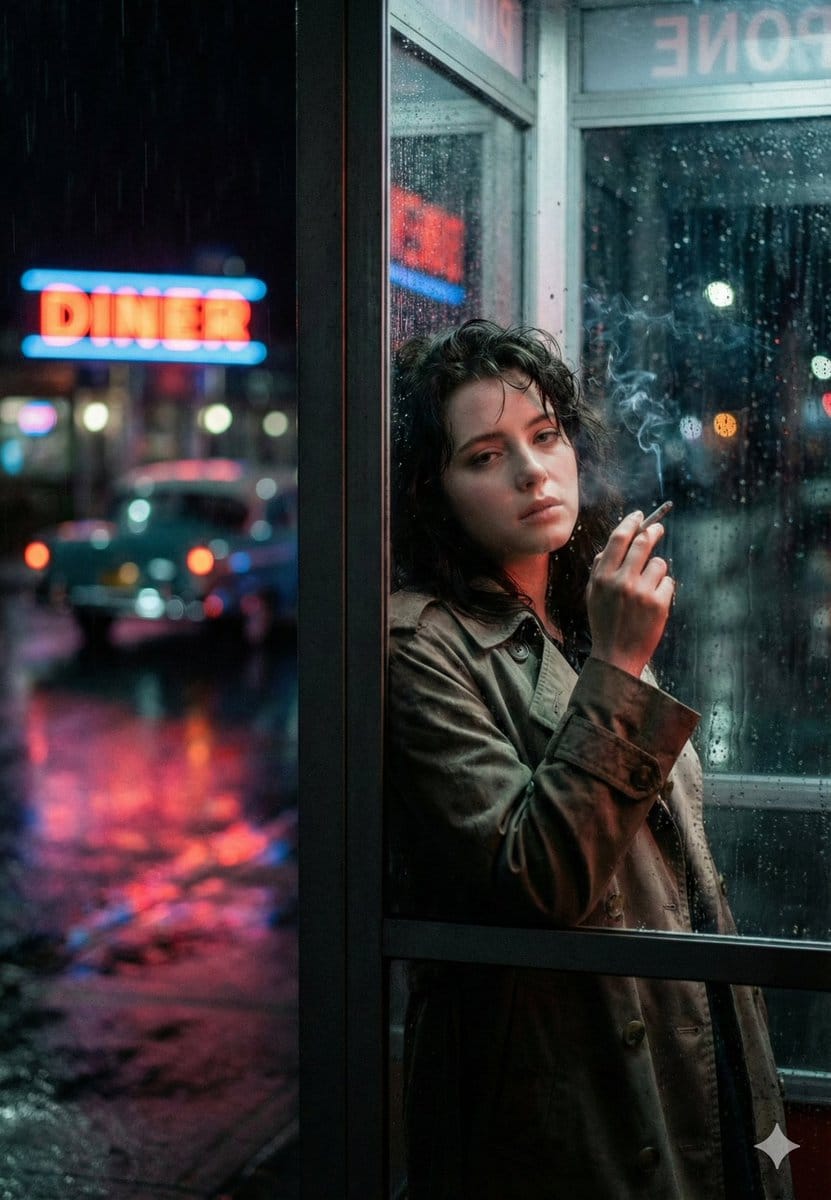
Neo-Noir Phone Booth Scene in the Rain - AI Generated Realistic Style Image
유사 이미지 생성

This prompt is optimized for Nano-banana-pro model

Neo-Noir Phone Booth Scene in the Rain

A cinematic image generation prompt for a photo-realistic, neo-noir scene featuring a young woman inside a glass phone booth on a rainy city street at night. The prompt details the mood (lonely, cinematic tension), lighting (neon practical lighting, cool

예시 프롬프트
{ "prompt_name": "Neon Rain Phone Booth Noir", "type": "photo_realistic", "aspect_ratio": "4:5", "scene": { "location": "rainy city street at night", "setting_detail": "a glass phone booth at the sidewalk edge, wet pavement reflecting neon signage", "weather": "steady rain, raindrops streaking on glass, puddles and reflections", "background": "soft bokeh city lights, blurry car tail lights, distant neon diner sign glowing red and blue", "mood": "neo-noir, lonely, cinematic tension, quiet sadness" }, "subject": { "description": "a young woman standing inside the phone booth, leaning slightly against the glass panel", "expression": "tired and distant, hollow gaze, subtle melancholy", "pose": "one shoulder forward, head tilted slightly down, looking toward the camera through the rain-streaked glass", "hands": "one hand raised holding a cigarette near her face", "wardrobe": { "outerwear": "oversized {argument name="coat color" default="beige"} trench coat, slightly worn texture, damp edges from rain", "innerwear": "dark top barely visible under the coat", "styling_notes": "minimal, grounded, realistic street styling" }, "hair": "messy wet hair clinging slightly to forehead and cheeks, natural volume", "skin_detail": "natural pores, soft under-eye shadows, no heavy makeup", "smoke": "thin cigarette smoke drifting upward, subtle and realistic" }, "composition": { "framing": "medium portrait, waist-up", "camera_angle": "eye level", "subject_position": "right side of frame, using the phone booth frame as strong vertical leading line", "foreground_elements": "glass reflections, raindrops in focus on some parts of the window", "depth_of_field": "shallow depth, subject sharp, background neon heavily blurred", "negative_space": "left side filled with rainy street, neon sign bokeh, cinematic breathing room" }, "camera_and_lens": { "camera_type": "cinematic full-frame digital", "lens": "50mm prime", "aperture": "f/1.8", "shutter_speed": "1/200", "iso": "2000", "focus": "sharp on subject eye and face, controlled softness through glass" }, "lighting_and_color": { "lighting_style": "neon practical lighting mixed with streetlight spill", "key_light": "soft cool-blue light from outside reflections", "fill_light": "faint warm-red neon bounce on cheek and coat edge", "color_palette": "deep blues, magenta/red neon accents, muted skin tones, dark shadows", "contrast": "medium-high contrast with smooth highlight rolloff", "reflections": "wet ground reflections, neon glow reflected on glass panels" }, "realism_and_texture": { "texture_priority": [ "raindrops on glass", "wet fabric trench coat texture", "skin pores and natural imperfections", "soft cigarette smoke trail" ], "grain": "subtle film grain for realism", "bokeh": "large c" }
AI로 생성하기

Pro Tip:

This realistic style prompt has been tested and optimized for best results. You can modify it slightly to customize the output while keeping the core structure intact.

AI 모델
Nano-banana-pro
제작자
Category
Realistic Style

자주 묻는 질문

realistic style 프롬프트에 대해 알아야 할 모든 것

이 realistic style 프롬프트는 어떻게 사용하나요?

위의 "AI로 생성하기" 버튼을 클릭하기만 하면 이 Realistic Style 프롬프트가 미리 입력된 AI 이미지 생성기로 이동합니다. 추가로 맞춤 설정하거나 바로 이미지를 생성할 수 있습니다. AI가 프롬프트를 해석하고 사용자의 설명에 따라 놀라운 realistic 비주얼을 만들어냅니다.

이 프롬프트를 특정 요구에 맞게 수정할 수 있나요?

물론입니다! 프롬프트를 복사하여 원하는 대로 자유롭게 맞춤 설정하세요. realistic 아트웍의 경우 스타일, 조명, 구도, 분위기 등에 대한 세부 정보를 추가해 보세요. 설명이 구체적일수록 AI가 창의적인 비전을 더 잘 이해할 수 있습니다. 더 많은 기술을 배우려면 realistic 프롬프트를 살펴보세요.

realistic style에 가장 적합한 AI 모델은 무엇인가요?

이 realistic 프롬프트는 Nano Banana, Flux, GPT-Image를 포함한 대부분의 최신 AI 이미지 생성기와 호환됩니다. 각 모델은 다른 측면에서 뛰어납니다. Nano Banana는 realistic 스타일에 탁월하고, Flux는 포토리얼리스틱한 결과물을 제공합니다.

좋은 realistic style 프롬프트란 무엇인가요?

훌륭한 realistic 프롬프트에는 구체적인 주제 세부사항, 아트 스타일 참조, 조명 조건(부드러운 조명, 드라마틱한 그림자), 색상 팔레트, 분위기, 기술 사양(4K, 디테일, HD) 등이 포함됩니다. 효과적인 패턴을 보려면 예시 프롬프트를 참고하세요.

이 프롬프트는 무료로 사용할 수 있나요?

네! 라이브러리에 있는 모든 프롬프트는 개인적 및 상업적 용도로 완전히 무료입니다. 제한 없이 realistic 아트웍을 복사, 수정, 제작하세요.

멋진 이미지를 만들 준비가 되셨나요?

이 프롬프트로 놀라운 AI 이미지 생성을 시작하거나, 방대한 프롬프트 라이브러리에서 더 많은 영감을 얻으세요.



