
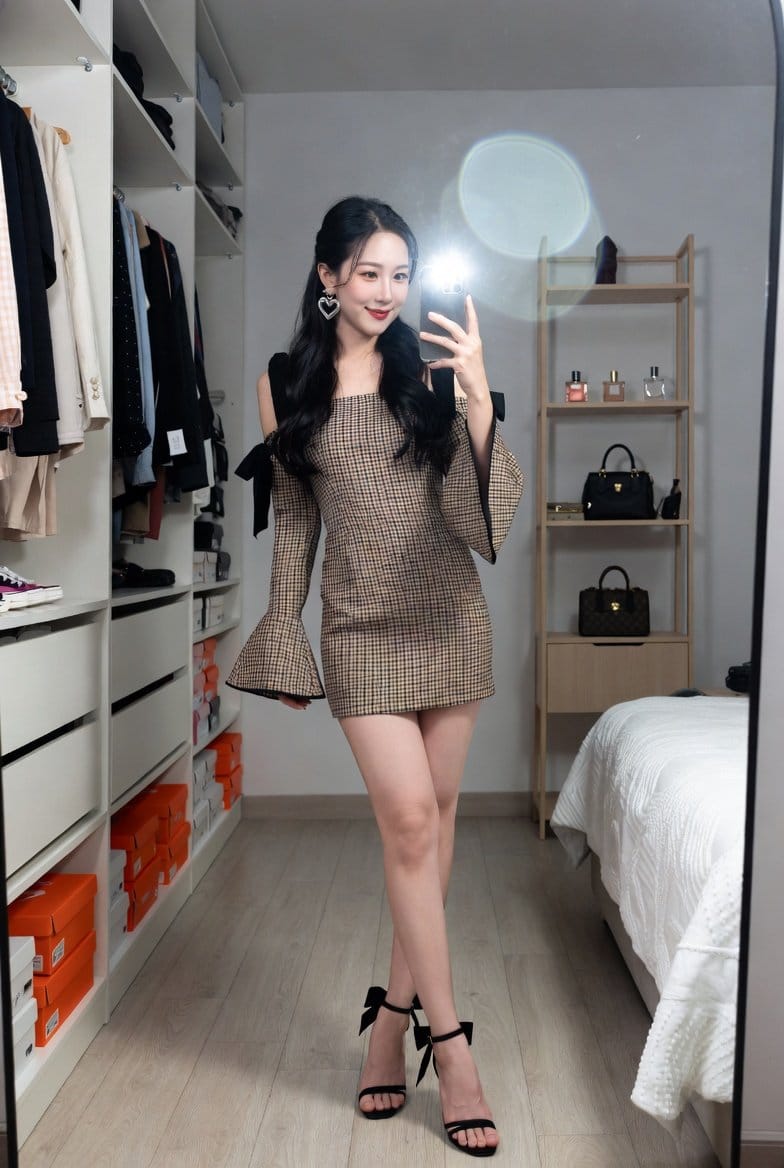
Mirror Selfie in Walk-In Closet Prompt

A detailed JSON prompt for generating a realistic lifestyle photograph of a young East Asian woman taking a mirror selfie in a cozy, organized walk-in closet, emphasizing attire details and the effect of a smartphone camera flash.

예시 프롬프트
{ "subject": { "person": "A young East Asian woman with long, wavy black hair and a soft smile.", "pose": "Full-body mirror selfie, standing with legs slightly crossed, holding a smartphone with the flash on.", "attire": { "dress": "A fitted, checkered (gingham) mini dress in black and tan/beige. Features long bell sleeves and black ribbon bows tied at the shoulders.", "footwear": "Black high-heeled sandals with thin ankle straps and decorative black bows on the heels.", "accessories": "Large silver heart-shaped drop earrings." } }, "setting": { "location": "A cozy, organized walk-in closet or bedroom.", "background_elements": [ "Open wardrobe with neatly hung clothes and stacked shoe boxes (orange and white).", "Minimalist wooden shelving unit holding perfumes and designer handbags.", "A bed with a white textured comforter on the right side.", "Light-colored wood laminate flooring." ], "lighting": "Indoor ambient light combined with a bright, direct circular light flare from the smartphone camera flash in the mirror." }, "technical_details": { "perspective": "Eye-level, vertical orientation, reflection in a large rectangular mirror.", "composition": "Centered subject, clean lines, depth created by the closet shelving.", "style": "Realistic lifestyle photography, clean aesthetic, high resolution.", "color_palette": "Neutral tones, beige, black, and white with pops of orange from shoe boxes." } }
AI로 생성하기
AI 모델
Nano-banana-pro
제작자

자주 묻는 질문

realistic style 프롬프트에 대해 알아야 할 모든 것

이 realistic style 프롬프트는 어떻게 사용하나요?

위의 "AI로 생성하기" 버튼을 클릭하기만 하면 이 Realistic Style 프롬프트가 미리 입력된 AI 이미지 생성기로 이동합니다. 추가로 맞춤 설정하거나 바로 이미지를 생성할 수 있습니다. AI가 프롬프트를 해석하고 사용자의 설명에 따라 놀라운 realistic 비주얼을 만들어냅니다.

이 프롬프트를 특정 요구에 맞게 수정할 수 있나요?

물론입니다! 프롬프트를 복사하여 원하는 대로 자유롭게 맞춤 설정하세요. realistic 아트웍의 경우 스타일, 조명, 구도, 분위기 등에 대한 세부 정보를 추가해 보세요. 설명이 구체적일수록 AI가 창의적인 비전을 더 잘 이해할 수 있습니다. 더 많은 기술을 배우려면 realistic 프롬프트를 살펴보세요.

realistic style에 가장 적합한 AI 모델은 무엇인가요?

이 realistic 프롬프트는 Nano Banana, Flux, GPT-Image를 포함한 대부분의 최신 AI 이미지 생성기와 호환됩니다. 각 모델은 다른 측면에서 뛰어납니다. Nano Banana는 realistic 스타일에 탁월하고, Flux는 포토리얼리스틱한 결과물을 제공합니다.

좋은 realistic style 프롬프트란 무엇인가요?

훌륭한 realistic 프롬프트에는 구체적인 주제 세부사항, 아트 스타일 참조, 조명 조건(부드러운 조명, 드라마틱한 그림자), 색상 팔레트, 분위기, 기술 사양(4K, 디테일, HD) 등이 포함됩니다. 효과적인 패턴을 보려면 예시 프롬프트를 참고하세요.

이 프롬프트는 무료로 사용할 수 있나요?

네! 라이브러리에 있는 모든 프롬프트는 개인적 및 상업적 용도로 완전히 무료입니다. 제한 없이 realistic 아트웍을 복사, 수정, 제작하세요.

More Prompts ➜
Pros and cons of real estate investment infographic - AI Image Prompt
Pros and cons of real estate investment infographic
A prompt to create an image that visually explains the pros and cons of real estate investment, ideal for educational or marketing posts.
by ネコ守|コツコツ不動産大家×マラソンは趣味
Physicist relaxing in a hammock with SPA drink - AI Image Prompt
Physicist relaxing in a hammock with SPA drink
Generates a scene of a physicist’s legs on a hammock with a drink and spa setting, surrounded only by trees and vegetation, ideal for relaxed conceptual imagery.
by Lautaro Vergara ??
Merge user with profile picture - AI Image Prompt
Merge user with profile picture
A short prompt to blend the user’s appearance with their profile picture, creating a hybrid portrait.
by Wirelyss ?️‍?️?
Bosch-inspired Harrowing of Hell follower scene - AI Image Prompt
Bosch-inspired Harrowing of Hell follower scene
An art-history-inspired prompt to generate a scene in the style of a follower of Jheronimus Bosch depicting Christ in Limbo, the Harrowing of Hell.
by @levelsio
Failed Map Generation Prompt - AI Image Prompt
Failed Map Generation Prompt
A simple prompt used to test GPT Image 1.5's ability to generate text and factual information, resulting in a failure to correctly draw a map of the U.S. with the correct number of states.
by Professor Scott Alan Turner ★
3x3 Grid Scene Generation with Numbering - AI Image Prompt
3x3 Grid Scene Generation with Numbering
A prompt designed to test the model's ability to generate a 3x3 grid of images, all depicting the same scene but from 9 different angles, and crucially, requiring the model to place the cell number in the bottom left corner of each scene.
by AZIZ | AI ??

멋진 이미지를 만들 준비가 되셨나요?

이 프롬프트로 놀라운 AI 이미지 생성을 시작하거나, 방대한 프롬프트 라이브러리에서 더 많은 영감을 얻으세요.

지금 생성하기 모든 프롬프트 둘러보기



