
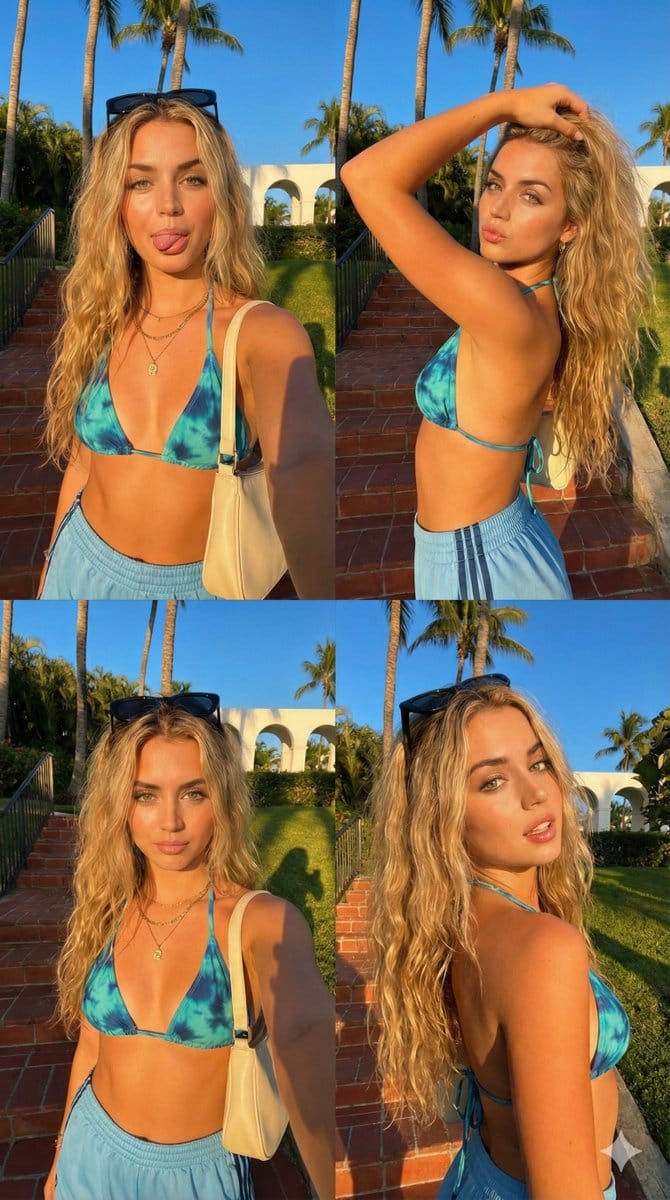
Megan Fox 2x2 Golden Hour Selfie Collage - AI Generated Realistic Style Image
유사 이미지 생성

This prompt is optimized for Nano-banana-pro model

Megan Fox 2x2 Golden Hour Selfie Collage

A highly structured JSON prompt for generating a 2x2 photo grid collage simulating candid iPhone selfies of Megan Fox, all taken during golden hour in a tropical Miami setting, with each panel featuring a slightly different pose and expression.

예시 프롬프트
{ "image_structure": { "format": "2x2 Photo Grid / Split Screen Collage", "total_panels": 4, "border_style": "Thin white separator lines between images", "overall_aspect_ratio": "9:16 (Vertical)", "panel_consistency": "Same subject, same outfit, same lighting, and same background in all 4 panels." }, "global_subject_details": { "demographics": "Fit {argument name="celebrity name" default="Megan Fox"}.", "skin": { "tone": "Fair and light, glowing sun-kissed skin.", "texture": "Smooth, high fidelity." }, "hair": { "color": "Black with lighter sun-bleached beachy highlights.", "style": "Long, messy waves, textured, voluminous.", "accessory": "Black sunglasses resting on top of head (visible in front-facing shots)." }, "facial_features": { "eyes": "Light blue, heavy black winged eyeliner.", "brows": "Groomed, arched light brown brows.", "nose": "Small, cute button nose." }, "outfit": { "top": "Orange and red beach crop top with V deep necklace.", "bottom": "Orange Adidas-style shorts with black side stripes.", "accessories": "Layered gold necklaces, black-colored shoulder bag with strap." } }, "panel_breakdown": { "top_left_panel": { "pose": "Selfie arm extended, body facing forward.", "expression": "Playful, tongue sticking out slightly to the side, eyes looking at camera.", "details": "Red shoulder bag visible on right shoulder, golden sunlight hitting left side of face." }, "top_right_panel": { "pose": "Side profile selfie, right arm lifted with hand running through hair.", "expression": "Exaggerated 'kissy face' pout, eyes looking at camera.", "details": "Elbow raised, showing side profile of body, hair falling down back." }, "bottom_left_panel": { "pose": "Front-facing selfie, similar to top-left but slightly zoomed out.", "expression": "Soft pout/kissy face (closed mouth), eyebrows slightly raised.", "details": "Golden hour shadow cast sharply behind her on the grass." }, "bottom_right_panel": { "pose": "Angled 3/4 turn, looking back over shoulder.", "expression": "Soft smirk/smile, mouth slightly open showing teeth, relaxed gaze.", "details": "Hair falling over right shoulder, sunlight illuminating the side of the face." } }, "environment_and_lighting": { "setting": "Tropical vibes in Miami beach. ", "background_objects": "Red brick/terracotta steps, tall palm trees against a deep blue sky, beach and ocean, green bushy foliage, Miami skyscrapers in distance.", "lighting_condition": "Golden Hour (late afternoon), strong directional sunlight creating high contrast and warm orange glow, long sharp shadows." }, "camera_settings": { "style": "iPhone selfie, candid social media aesthetic.", "focal_length": "Wide angle (front facing camera feel).", " } }
AI로 생성하기

Pro Tip:

This realistic style prompt has been tested and optimized for best results. You can modify it slightly to customize the output while keeping the core structure intact.

AI 모델
Nano-banana-pro
제작자
Category
Realistic Style

자주 묻는 질문

realistic style 프롬프트에 대해 알아야 할 모든 것

이 realistic style 프롬프트는 어떻게 사용하나요?

위의 "AI로 생성하기" 버튼을 클릭하기만 하면 이 Realistic Style 프롬프트가 미리 입력된 AI 이미지 생성기로 이동합니다. 추가로 맞춤 설정하거나 바로 이미지를 생성할 수 있습니다. AI가 프롬프트를 해석하고 사용자의 설명에 따라 놀라운 realistic 비주얼을 만들어냅니다.

이 프롬프트를 특정 요구에 맞게 수정할 수 있나요?

물론입니다! 프롬프트를 복사하여 원하는 대로 자유롭게 맞춤 설정하세요. realistic 아트웍의 경우 스타일, 조명, 구도, 분위기 등에 대한 세부 정보를 추가해 보세요. 설명이 구체적일수록 AI가 창의적인 비전을 더 잘 이해할 수 있습니다. 더 많은 기술을 배우려면 realistic 프롬프트를 살펴보세요.

realistic style에 가장 적합한 AI 모델은 무엇인가요?

이 realistic 프롬프트는 Nano Banana, Flux, GPT-Image를 포함한 대부분의 최신 AI 이미지 생성기와 호환됩니다. 각 모델은 다른 측면에서 뛰어납니다. Nano Banana는 realistic 스타일에 탁월하고, Flux는 포토리얼리스틱한 결과물을 제공합니다.

좋은 realistic style 프롬프트란 무엇인가요?

훌륭한 realistic 프롬프트에는 구체적인 주제 세부사항, 아트 스타일 참조, 조명 조건(부드러운 조명, 드라마틱한 그림자), 색상 팔레트, 분위기, 기술 사양(4K, 디테일, HD) 등이 포함됩니다. 효과적인 패턴을 보려면 예시 프롬프트를 참고하세요.

이 프롬프트는 무료로 사용할 수 있나요?

네! 라이브러리에 있는 모든 프롬프트는 개인적 및 상업적 용도로 완전히 무료입니다. 제한 없이 realistic 아트웍을 복사, 수정, 제작하세요.

멋진 이미지를 만들 준비가 되셨나요?

이 프롬프트로 놀라운 AI 이미지 생성을 시작하거나, 방대한 프롬프트 라이브러리에서 더 많은 영감을 얻으세요.



