
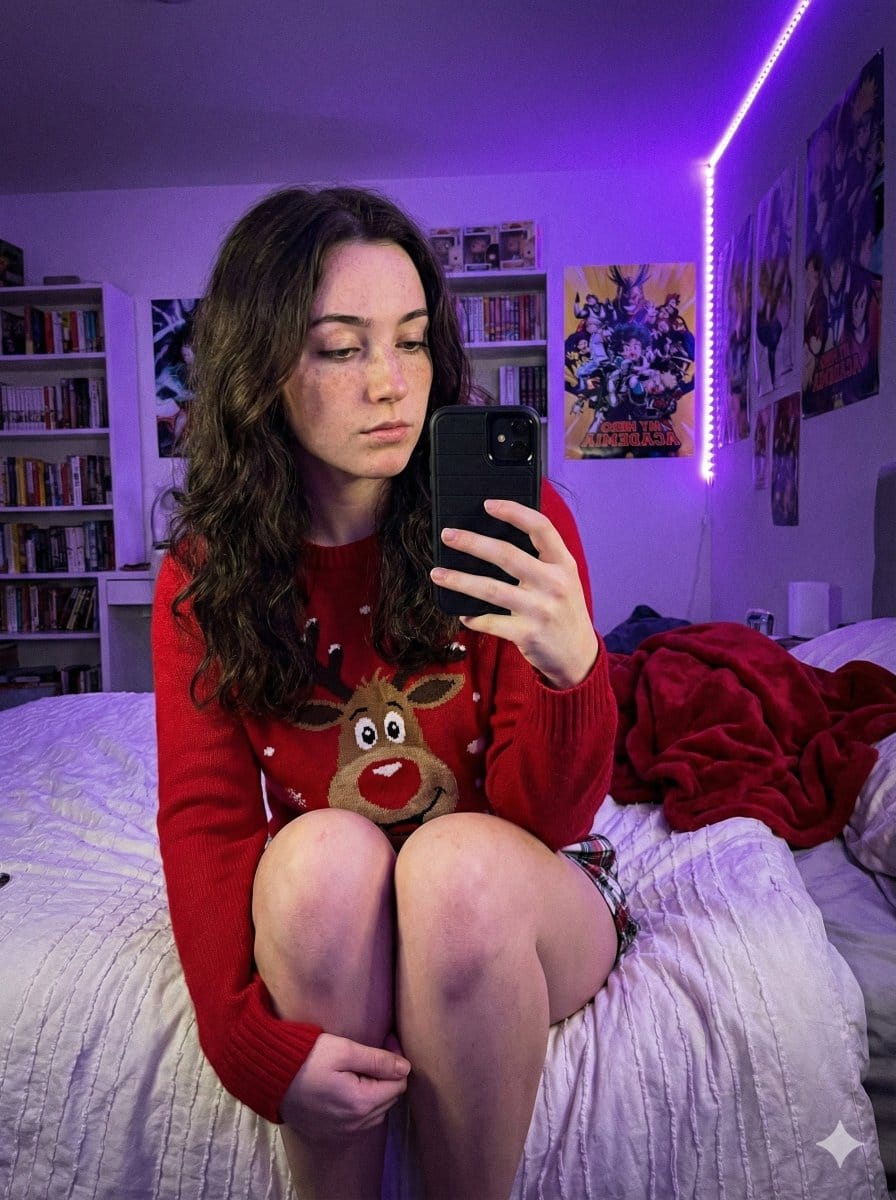
Low-Light Smartphone Selfie in Gen Z Bedroom

A highly specific prompt for generating an ultra-photorealistic image simulating a low-light smartphone selfie taken in a Gen Z bedroom. The prompt details the subject's appearance (freckles, dark hair), clothing (holiday sweater, plaid shorts), pose (sit

예시 프롬프트
{   "prompt_structure": {     "subject_details": {       "demographics": "Young female, fair skin tone, natural appearance with distinct freckles across nose and cheeks",       "facial_features": "Soft facial structure, neutral to soft expression, gaze directed down at phone",       "hair": "Long, dark brown, loose wavy texture, center part, draping over shoulders",       "clothing": {         "top": "{argument name=\"sweater type\" default=\"Red crewneck holiday sweater featuring a large cartoon reindeer face\"}",         "bottom": "Plaid pajama shorts (only small section visible at upper thigh)"       },       "pose": "Sitting upright on a bed, body angled slightly to viewer's left. Both legs are bent sharply at the knees and drawn up tightly against the torso. The shins are prominent, and feet are tucked near the buttocks. Right hand holds a smartphone with a black case up in front of the body to take a selfie."     },     "environment_context": {       "setting": "Gen Z bedroom / dorm room context",       "background_elements": [         "White floating shelves packed with diverse colorful books",         "Anime posters on white walls (My Hero Academia clearly visible)",         "LED strip lights running vertically along the wall corner",         "Messy unmade bed with white textured duvet or blanket",         "Crumpled red fleece throw blanket in background on bed"       ]     },     "lighting_atmosphere": {       "primary_source": "Dominant Purple/Violet LED ambient lighting originating from corner strip",       "quality": "Dim, soft, moody, atmospheric, strong colored purple cast on skin, clothing, and surroundings",       "shadows": "Soft, diffused shadows created by the ambient colored light"     },     "camera_technical": {       "style": "Casual Smartphone Selfie, Candid shot",       "simulation": "Smartphone Main Sensor Simulation",       "angle": "Slightly low angle, looking slightly up at the subject",       "focal_length": "Approx 24-28mm wide angle (phone lens equivalent)",       "aperture": "f/1.7 wide open",       "iso": "High ISO (approx 800-1600) resulting in visible fine digital noise/grain",       "focus": "Sharp focus on subject's face and knees, slight depth of field blur on background bookshelf"     },     "quality_modifiers": {       "engine": "Nano Banana Pro",       "details": "Ultra Photorealistic, 8k resolution, raw photo style, realistic skin texture with highly visible pores and freckles underneath purple light, tangible fabric texture details on sweater and blanket, authentic low-light smartphone digital noise grain."     },     "negative_prompt": "cartoon, illustration, anime, painting, 3D render, drawing, sketch, abstract, low quality, blurry, pixelated, unnatural skin, doll-like, oversaturated, flat lighting, stylized, idealized, unrealistic, smooth skin, denoised"   } }
AI로 생성하기
AI 모델
Nano-banana-pro
제작자
Lex

자주 묻는 질문

realistic style 프롬프트에 대해 알아야 할 모든 것

이 realistic style 프롬프트는 어떻게 사용하나요?

위의 "AI로 생성하기" 버튼을 클릭하기만 하면 이 Realistic Style 프롬프트가 미리 입력된 AI 이미지 생성기로 이동합니다. 추가로 맞춤 설정하거나 바로 이미지를 생성할 수 있습니다. AI가 프롬프트를 해석하고 사용자의 설명에 따라 놀라운 realistic 비주얼을 만들어냅니다.

이 프롬프트를 특정 요구에 맞게 수정할 수 있나요?

물론입니다! 프롬프트를 복사하여 원하는 대로 자유롭게 맞춤 설정하세요. realistic 아트웍의 경우 스타일, 조명, 구도, 분위기 등에 대한 세부 정보를 추가해 보세요. 설명이 구체적일수록 AI가 창의적인 비전을 더 잘 이해할 수 있습니다. 더 많은 기술을 배우려면 realistic 프롬프트를 살펴보세요.

realistic style에 가장 적합한 AI 모델은 무엇인가요?

이 realistic 프롬프트는 Nano Banana, Flux, GPT-Image를 포함한 대부분의 최신 AI 이미지 생성기와 호환됩니다. 각 모델은 다른 측면에서 뛰어납니다. Nano Banana는 realistic 스타일에 탁월하고, Flux는 포토리얼리스틱한 결과물을 제공합니다.

좋은 realistic style 프롬프트란 무엇인가요?

훌륭한 realistic 프롬프트에는 구체적인 주제 세부사항, 아트 스타일 참조, 조명 조건(부드러운 조명, 드라마틱한 그림자), 색상 팔레트, 분위기, 기술 사양(4K, 디테일, HD) 등이 포함됩니다. 효과적인 패턴을 보려면 예시 프롬프트를 참고하세요.

이 프롬프트는 무료로 사용할 수 있나요?

네! 라이브러리에 있는 모든 프롬프트는 개인적 및 상업적 용도로 완전히 무료입니다. 제한 없이 realistic 아트웍을 복사, 수정, 제작하세요.

More Prompts ➜
Opposite camera view of anime girl by the river - AI Image Prompt
Opposite camera view of anime girl by the river
A prompt for changing the camera angle to view an existing character from behind while maintaining pose and scene consistency.
by B.M. Cifer
Boudoir portrait in charcoal sketch 4K - AI Image Prompt
Boudoir portrait in charcoal sketch 4K
A concise prompt to create a high-resolution boudoir portrait rendered in a charcoal sketch style.
by Hagbard Celine
Bench press muscle diagram - AI Image Prompt
Bench press muscle diagram
A straightforward anatomy prompt that generates a body diagram highlighting the muscles activated during the bench press exercise.
by Martin LeBlanc
Minecraft Liminal Space Image Prompt - AI Image Prompt
Minecraft Liminal Space Image Prompt
A simple, direct prompt instructing GPT-image-1.5 to create an image depicting a liminal space within the aesthetic of the Minecraft video game.
by JB
Image Generation Prompt for HTML/CSS Explanation Diagram - AI Image Prompt
Image Generation Prompt for HTML/CSS Explanation Diagram
A user tested the new GPT Image 1.5 model, finding that NanoBanana Pro still performs better for generating images containing Japanese text. The user provides the specific prompt used to generate a diagram explaining HTML and CSS clearly.
by 神山 | 知らないと損するAI活用術
Photorealistic Image Generation based on Classical Chinese Poetry - AI Image Prompt
Photorealistic Image Generation based on Classical Chinese Poetry
This prompt uses a famous classical Chinese poem (Ode to the Goose) to set the scene and mood, requesting a photorealistic, high-definition image with specific camera parameters and texture details, simulating a real-life portrait photography style.
by 就是玩AI

멋진 이미지를 만들 준비가 되셨나요?

이 프롬프트로 놀라운 AI 이미지 생성을 시작하거나, 방대한 프롬프트 라이브러리에서 더 많은 영감을 얻으세요.

지금 생성하기 모든 프롬프트 둘러보기



