
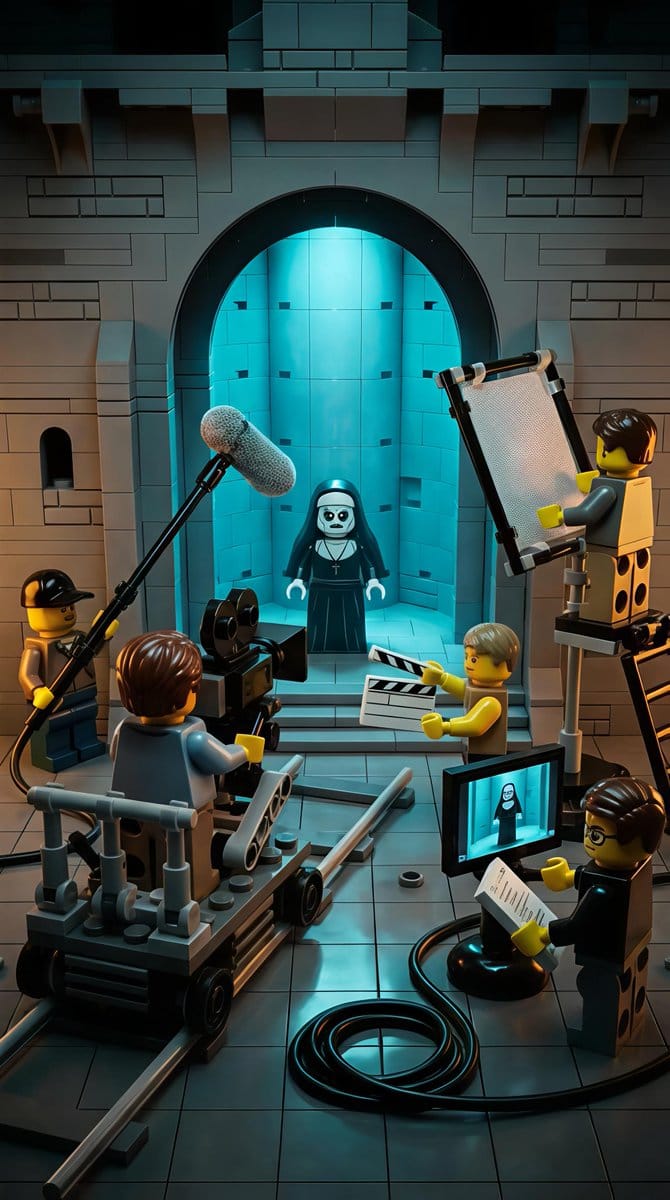
LEGO Miniature Diorama of 'The Nun' Horror Film Set - AI Generated Character Style Image
유사 이미지 생성

This prompt is optimized for Nano-banana-pro model

LEGO Miniature Diorama of 'The Nun' Horror Film Set

A creative JSON prompt for generating a LEGO miniature diorama scene depicting the film set of the horror movie 'The Nun'. It includes detailed descriptions of the gothic stone interior, the LEGO nun character, and various LEGO minifigure crew members (ca

예시 프롬프트
{ "scene_overview": { "setting": "Gothic stone interior resembling a church or cathedral set", "environment_style": "LEGO miniature diorama", "location_type": "Film set / behind-the-scenes movie production", "time_of_day": "Interior, controlled lighting (cinematic night-like mood)", "atmosphere": "Cinematic, eerie, theatrical, controlled", "mood": "Dark humor, spooky, playful, creative", "genre_influence": ["Horror", "Behind-the-scenes filmmaking", "Fantasy"] }, "primary_subject": { "type": "LEGO minifigure character", "role": "Nun / horror character", "appearance": { "outfit": "Black nun habit with white collar", "face": "Pale white face, dark hollow eyes, eerie expression", "accessories": "Cross necklace", "pose": "Standing still, facing forward" }, "positioning": { "location": "Centered within a large stone archway", "background": "Glowing blue-lit alcove or chamber" } }, "supporting_characters": { "crew_members": [ { "role": "Camera operator", "object_interaction": "Operating a large LEGO film camera", "position": "Front-left, seated on a camera dolly" }, { "role": "Boom microphone operator", "object_interaction": "Holding boom mic extended toward subject", "position": "Upper-left foreground" }, { "role": "Lighting technician", "object_interaction": "Holding a rectangular light reflector", "position": "Right side, elevated on a stand" }, { "role": "Clapperboard operator", "object_interaction": "Holding a clapperboard", "position": "Front-center-right" }, { "role": "Director / Script supervisor", "object_interaction": "Holding clipboard and papers", "position": "Bottom-right foreground" } ], "style": "All characters are LEGO minifigures with yellow skin tone and varied hairpieces" }, "props_and_equipment": { "film_equipment": [ "LEGO cinema camera", "Camera dolly on rails", "Boom microphone with fuzzy windscreen", "Lighting reflector panel", "Clapperboard", "Monitor screen displaying the nun character", "Cables coiled on the floor" ], "architectural_elements": [ "Stone brick walls", "Large arched doorway", "Recessed alcove", "Tiled stone floor" ] }, "lighting": { "primary_light": "Strong cyan-blue glow from behind the nun", "secondary_lighting": "Warm neutral studio lighting on crew and foreground", "contrast": "High contrast between cold blue background and warm foreground tones", "style": "Cinematic, dramatic, horror-inspired lighting" }, "color_palette": { "dominant_colors": ["Dark gray", "Black", "Cyan blue"], "accent_colors": ["Warm yellow ("
AI로 생성하기

Pro Tip:

This character style prompt has been tested and optimized for best results. You can modify it slightly to customize the output while keeping the core structure intact.

AI 모델
Nano-banana-pro
제작자
Category
Character Style

자주 묻는 질문

character style 프롬프트에 대해 알아야 할 모든 것

이 character style 프롬프트는 어떻게 사용하나요?

위의 "AI로 생성하기" 버튼을 클릭하기만 하면 이 Character Style 프롬프트가 미리 입력된 AI 이미지 생성기로 이동합니다. 추가로 맞춤 설정하거나 바로 이미지를 생성할 수 있습니다. AI가 프롬프트를 해석하고 사용자의 설명에 따라 놀라운 character 비주얼을 만들어냅니다.

이 프롬프트를 특정 요구에 맞게 수정할 수 있나요?

물론입니다! 프롬프트를 복사하여 원하는 대로 자유롭게 맞춤 설정하세요. character 아트웍의 경우 스타일, 조명, 구도, 분위기 등에 대한 세부 정보를 추가해 보세요. 설명이 구체적일수록 AI가 창의적인 비전을 더 잘 이해할 수 있습니다. 더 많은 기술을 배우려면 character 프롬프트를 살펴보세요.

character style에 가장 적합한 AI 모델은 무엇인가요?

이 character 프롬프트는 Nano Banana, Flux, GPT-Image를 포함한 대부분의 최신 AI 이미지 생성기와 호환됩니다. 각 모델은 다른 측면에서 뛰어납니다. Nano Banana는 character 스타일에 탁월하고, Flux는 포토리얼리스틱한 결과물을 제공합니다.

좋은 character style 프롬프트란 무엇인가요?

훌륭한 character 프롬프트에는 구체적인 주제 세부사항, 아트 스타일 참조, 조명 조건(부드러운 조명, 드라마틱한 그림자), 색상 팔레트, 분위기, 기술 사양(4K, 디테일, HD) 등이 포함됩니다. 효과적인 패턴을 보려면 예시 프롬프트를 참고하세요.

이 프롬프트는 무료로 사용할 수 있나요?

네! 라이브러리에 있는 모든 프롬프트는 개인적 및 상업적 용도로 완전히 무료입니다. 제한 없이 character 아트웍을 복사, 수정, 제작하세요.

더 많은 프롬프트 탐색 ➜

영감 얻기: 이 AI 프롬프트를 사용해보세요

창의성을 자극하는 엄선된 AI 프롬프트. "지금 사용해보기"를 클릭하여 유사한 이미지를 즉시 생성하세요!

Ultra-Realistic South Asian Woman in Saree Portrait - AI Generated Character Style Image Example
Ultra-Realistic South Asian Woman in Saree Portrait
An extensive JSON prompt for Nano Banana Pro via Gemini, designed to create an ultra-realistic, 4K p...
by Shreya♡
Character Style
Dreamy iPhone Selfie Prompt with Identity Lock - AI Generated AI Art Style Image Example
Dreamy iPhone Selfie Prompt with Identity Lock
A complex image generation prompt for Gemini Nano Banana Pro designed to create a casual, playful iP...
by Anissa
AI Art Style
Monochromatic High-Fashion Portrait with Satin Drape - AI Generated Character Style Image Example
Monochromatic High-Fashion Portrait with Satin Drape
A highly detailed, structured prompt for Nano Banana Pro 3.0 to create an ultra-realistic, high-fash...
by NanoInspire
Character Style
LINE sticker sheet from an attached image - AI Generated Character Style Image Example
LINE sticker sheet from an attached image
A Japanese prompt to turn an attached character image into 16 different chibi stickers with speech a...
by 成阿ハルキ⭐?
Character Style
Convert scene to low-res pixel art - AI Generated Pixel art Style Image Example
Convert scene to low-res pixel art
A brief prompt instructing the model to recreate an entire scene, including water splashes and backg...
by proper
Pixel art Style
Convert image into YouTube thumbnail with OMW text - AI Generated AI Art Style Image Example
Convert image into YouTube thumbnail with OMW text
A prompt to turn an existing image into a YouTube thumbnail and overlay large background text readin...
by Dreaming Tulpa ??
AI Art Style

더 많은 프롬프트 아이디어가 필요하신가요?

애니메이션, 사실적, 추상 등 여러 카테고리에 걸친 {count}+ AI 프롬프트의 방대한 라이브러리를 둘러보세요!

모든 프롬프트 둘러보기

멋진 이미지를 만들 준비가 되셨나요?

이 프롬프트로 놀라운 AI 이미지 생성을 시작하거나, 방대한 프롬프트 라이브러리에서 더 많은 영감을 얻으세요.



