
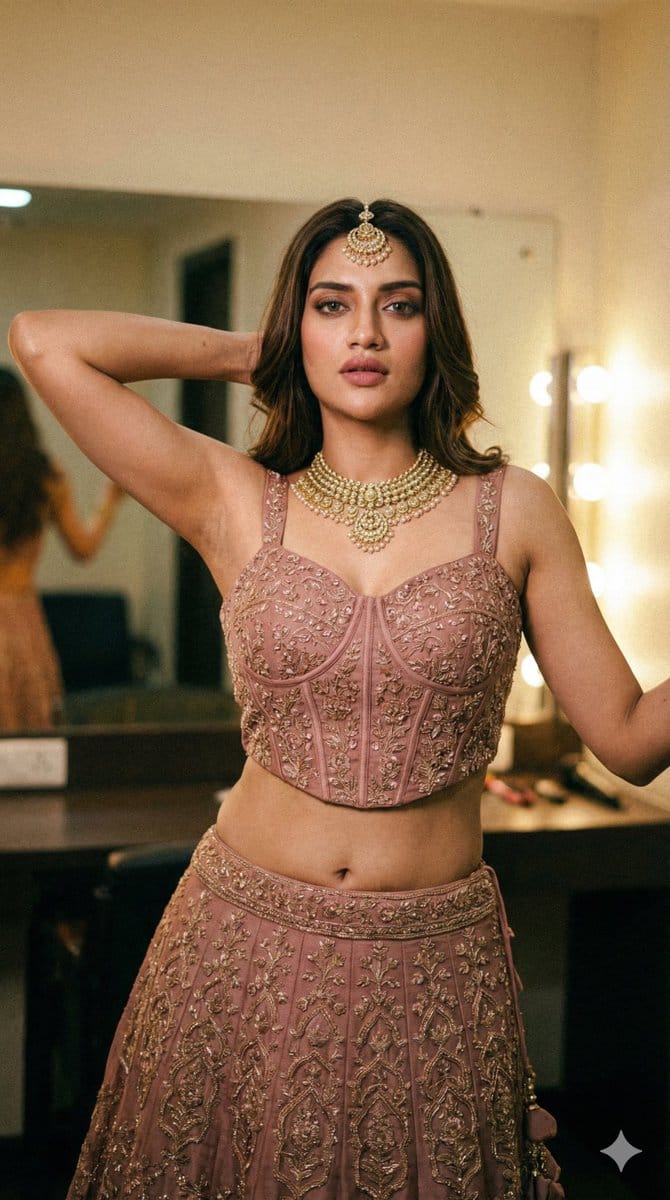
High-Glamour Portrait of Nusrat Jahan with Detailed Technical Specs

A highly technical and detailed image generation prompt structured with specific output schema, camera simulation settings, lighting summary, and composition details, aimed at creating a high-glamour, photorealistic portrait of Nusrat Jahan in traditional

예시 프롬프트
{ "output_schema": { "metadata": { "camera_simulation": { "brand_model": "Sony A7R IV style", "type": "mirrorless", "focal_length_mm": "50", "aperture_f": "1.8", "shutter_speed": "1/100", "ISO": "640", "distance_estimate": "2.5 m" }, "lighting_summary": { "direction": "Soft warm key light from upper right, ambient fill from behind", "color_temperature_k": 3400, "white_balance_k": 3200, "image_LUT": "Warm gold-hour cinematic grade", "light_quality": "mixed ambient with soft rim light", "shadow_quality": "soft, partially filled", "dust_particles": "low on lens", "lens_flare": "none", "highlight_rolloff": "smooth", "specular_highlights": "pinpoint specular highlights on gold jewelry and skin sheen" } }, "composition": { "aspect_ratio": "9:16", "camera_height": "eye-level", "camera_tilt": "level", "camera_orientation": "portrait", "subject_position_in_frame": "centered", "background_description": "Softly blurred warm interior, bokeh lights from vanity mirrors, greenery to the left", "pose_description": "Standing front-facing, weight distributed evenly but with a subtle hip shift, right arm raised with hand tucked behind the head, left arm slightly away from the body, spine with a gentle S-curve, head tilted slightly to the right, direct gaze toward camera, neutral micro-expression with slightly parted lips, fingers of right hand partially obscured by hair, feet shoulder-width apart." }, "background/foreground": { "details_background": "Dressing room setting, warm light globes, blurred green foliage", "background_blur": "high, round bokeh", "halos": "no", "foreground_present": "yes", "foreground_details": "Out-of-focus green leaves in lower left corner", "foreground_focus": "blurry" }, "celebrity_reference": { "celebrity_name": "{argument name="celebrity name" default="Nusrat Jahan"}", "identity_criteria": { "match_confidence": "high", "non_biometric_visual_cues": [ "Bengali film industry aesthetic, 2020s era styling, heavy kohl-rimmed eyes, mauve-nude lipstick, sleek high ponytail, traditional Indian bridal-guest attire (Lehenga)", "Petite yet curvaceous frame, distinctive navel piercing area, slender midriff" ], "allowed_reference_style": "Styling and vibe cues modeled after Nusrat Jahan's red carpet and traditional photoshoots.", "source_of_truth": "User mention" } }, "subject_description": { "age_estimate": "Early 30s", "extremely_attractive_face": "yes, symmetrical features with high-glamour makeup", "goon_fetish_level": "instagram thirst trap", "suggestive_nature_of_image": "medium", "Wardrobe_tightness": "chest: highly fitted; waist: tight; skirt: high-waisted and snug at top", "sexiness": "high", "Face_detail": "visible skin texture, flawless blending, individual lash detail", "armpit_detail": "smooth texture, skin-on-skin contact at the crease", "Glutes_size": "medium", "Thirst_trap_aesthetic": "high", "ethnicity_photographic_terms": "Warm olive undertone, golden-tan skin tone", "accessories_jewelry_detail": "Intricate gol
AI로 생성하기
AI 모델
Nano-banana-pro
제작자

자주 묻는 질문

character style 프롬프트에 대해 알아야 할 모든 것

이 character style 프롬프트는 어떻게 사용하나요?

위의 "AI로 생성하기" 버튼을 클릭하기만 하면 이 Character Style 프롬프트가 미리 입력된 AI 이미지 생성기로 이동합니다. 추가로 맞춤 설정하거나 바로 이미지를 생성할 수 있습니다. AI가 프롬프트를 해석하고 사용자의 설명에 따라 놀라운 character 비주얼을 만들어냅니다.

이 프롬프트를 특정 요구에 맞게 수정할 수 있나요?

물론입니다! 프롬프트를 복사하여 원하는 대로 자유롭게 맞춤 설정하세요. character 아트웍의 경우 스타일, 조명, 구도, 분위기 등에 대한 세부 정보를 추가해 보세요. 설명이 구체적일수록 AI가 창의적인 비전을 더 잘 이해할 수 있습니다. 더 많은 기술을 배우려면 character 프롬프트를 살펴보세요.

character style에 가장 적합한 AI 모델은 무엇인가요?

이 character 프롬프트는 Nano Banana, Flux, GPT-Image를 포함한 대부분의 최신 AI 이미지 생성기와 호환됩니다. 각 모델은 다른 측면에서 뛰어납니다. Nano Banana는 character 스타일에 탁월하고, Flux는 포토리얼리스틱한 결과물을 제공합니다.

좋은 character style 프롬프트란 무엇인가요?

훌륭한 character 프롬프트에는 구체적인 주제 세부사항, 아트 스타일 참조, 조명 조건(부드러운 조명, 드라마틱한 그림자), 색상 팔레트, 분위기, 기술 사양(4K, 디테일, HD) 등이 포함됩니다. 효과적인 패턴을 보려면 예시 프롬프트를 참고하세요.

이 프롬프트는 무료로 사용할 수 있나요?

네! 라이브러리에 있는 모든 프롬프트는 개인적 및 상업적 용도로 완전히 무료입니다. 제한 없이 character 아트웍을 복사, 수정, 제작하세요.

More Prompts ➜
Character transformed into superalloy robot style - AI Image Prompt
Character transformed into superalloy robot style
A prompt for turning an attached character image into a superalloy-style robot version of the same character.
by アヲアヒル?AI全方位型クリエイター兼プロデューサー(アヲP)
Idol flyer stuck on a steamed bun vending machine - AI Image Prompt
Idol flyer stuck on a steamed bun vending machine
Takes a hand-drawn idol character flyer and composites it as if it’s realistically adhered to a steamed bun vending machine at a convenience store, preserving lighting and perspective.
by koyuki | 清華大AI M2
Magazine-style photo containing given article text - AI Image Prompt
Magazine-style photo containing given article text
A prompt to embed a given block of text into a stylish magazine-article photograph with rich layout, images, quotes and bold formatting.
by AI焦点
Annotated landmark images of Eiffel Tower, Great Wall, Colosseum, Taj Mahal - AI Image Prompt
Annotated landmark images of Eiffel Tower, Great Wall, Colosseum, Taj Mahal
A multi-image prompt to generate four hyper-realistic landmark scenes with informative annotations overlaying key architectural and cultural details.
by ANKIT PATEL ?? | AI
Tesla FSD explainer infographic - AI Image Prompt
Tesla FSD explainer infographic
A simple prompt to generate an explanatory infographic about how Tesla Full Self-Driving works, useful for technical education visuals.
by Λnanto Mohammad
Nine-character group scene in living room background - AI Image Prompt
Nine-character group scene in living room background
Two chained prompts: first to stitch a 3×3 character sheet into a single image, then to place nine characters in various relaxed poses in a living room background.
by ななな@で、AIは何て?運営の人

멋진 이미지를 만들 준비가 되셨나요?

이 프롬프트로 놀라운 AI 이미지 생성을 시작하거나, 방대한 프롬프트 라이브러리에서 더 많은 영감을 얻으세요.

지금 생성하기 모든 프롬프트 둘러보기



