
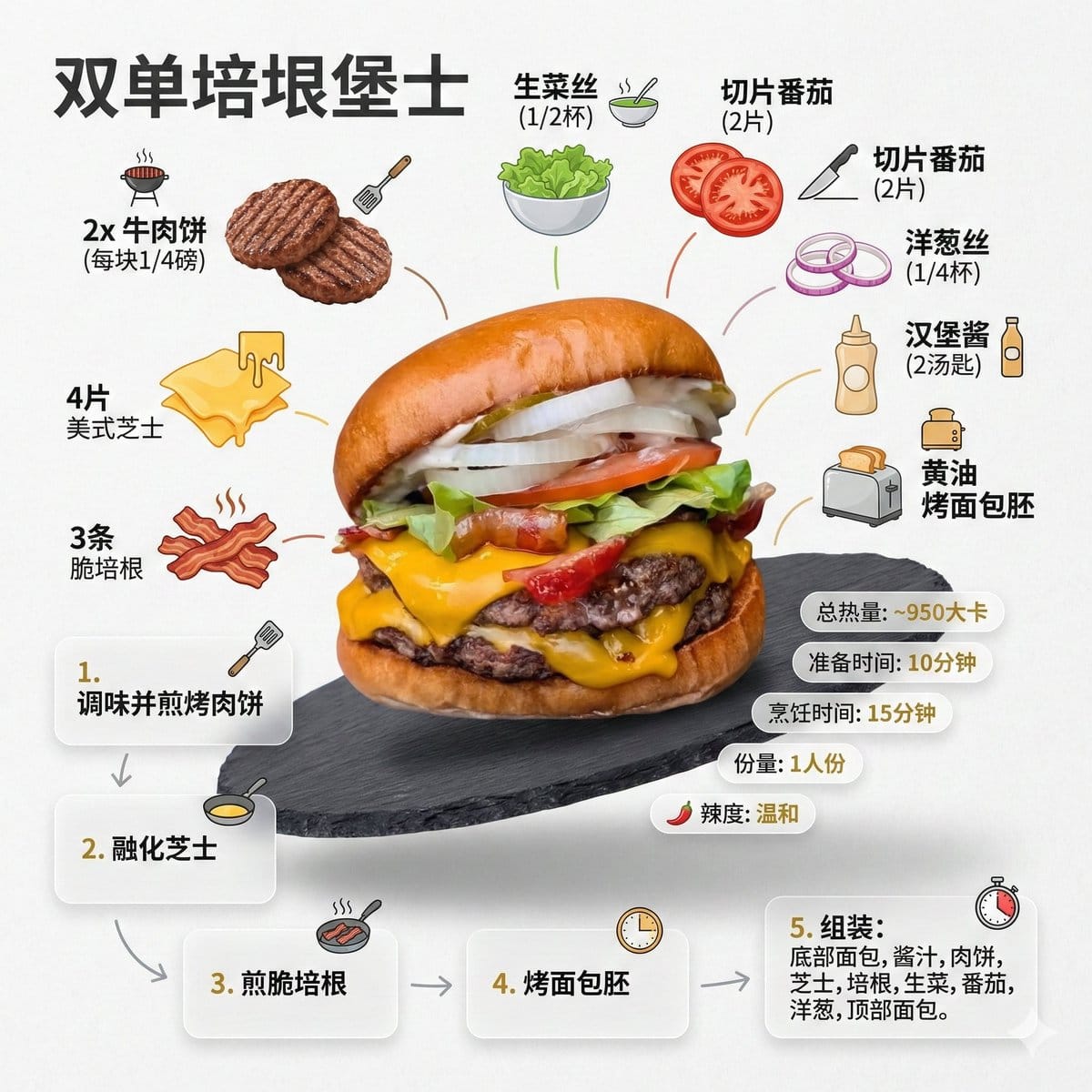
Generating a Food Infographic for a Hamburger - AI Generated Abstract Style Image
유사 이미지 생성

This prompt is optimized for Nano-banana-pro model

Generating a Food Infographic for a Hamburger

A detailed, multi-step prompt template designed for Nano Banana Pro to generate a clean, modern food recipe infographic based on an uploaded image (in this case, a hamburger). The prompt specifies visual style, layout, required Chinese text, ingredient li

예시 프롬프트
Role Setting: You are an AI prompt engineer proficient in food photography and visual design. Task: Please analyze the food image I uploaded, identify the dish name, main ingredients, cooking logic, and approximate calories. Output: Please strictly follow the following [General Prompt Template] format, fill in the specific content analyzed, and generate a prompt for AI painting. [General Prompt Template] Ultra-clean, modern style recipe infographic. Display the {argument name="dish name" default="[Fill in the analyzed dish name here]"} in a highly attractive finished form, with a slight floating effect, using a perspective or tilted view. Arrange the ingredients, steps, and tips around the main dish in a dynamic, editorial layout, not limited to a top-down view. Core Instruction (Language): All text, labels, and step descriptions in the image must strictly use "Simplified Chinese." 1. Ingredient Area: Pair each ingredient ({argument name="main ingredients list" default="[Fill in the analyzed list of 5-8 main ingredients here]"}) with an icon or mini illustration, and label the quantity in Chinese. Arrange them in groups, lists, or circular flow lines, connected to the main dish via visual lines. 2. Step Area: Use numbered panels (1, 2, 3...), arrows, or lines to display the production process ({argument name="key cooking steps" default="[Fill in the inferred 3-4 key cooking steps here]"}), forming a clear logical flow around the main dish. 3. Supplementary Information (Optional): Label in Chinese: Total calories ([Estimated calories]), preparation time ([Estimated time]), cooking time ([Estimated time]), serving size, spiciness, etc., presented in simple bubbles or badge forms near the main dish. 4. Visual Style: Editorial infographic combined with lifestyle food photography. Food colors are bright and natural, paired with slight shadows, clean vector icons, and modern sans-serif fonts (Chinese HeiTi style). Step panels can use soft gradients or glass-morphism effects. Accent colors are used to highlight key information. 5. Composition Guide: The finished dish serves as the visual core, using perspective or a tilted angle; Ingredients and steps flow dynamically around the main dish; Clear hierarchy: Main dish > Steps > Ingredients > Optional data; Maintain sufficient white space for an overall light and readable feel. 6. Lighting and Background: Soft, natural studio lighting, minimalist texture or gradient background, creating a high-end editorial look. 7. Output Specifications: 1080×1080, ultra-sharp, suitable for social media display, no watermark.
AI로 생성하기

Pro Tip:

This abstract style prompt has been tested and optimized for best results. You can modify it slightly to customize the output while keeping the core structure intact.

AI 모델
Nano-banana-pro
제작자
Category
Abstract Style

자주 묻는 질문

abstract style 프롬프트에 대해 알아야 할 모든 것

이 abstract style 프롬프트는 어떻게 사용하나요?

위의 "AI로 생성하기" 버튼을 클릭하기만 하면 이 Abstract Style 프롬프트가 미리 입력된 AI 이미지 생성기로 이동합니다. 추가로 맞춤 설정하거나 바로 이미지를 생성할 수 있습니다. AI가 프롬프트를 해석하고 사용자의 설명에 따라 놀라운 abstract 비주얼을 만들어냅니다.

이 프롬프트를 특정 요구에 맞게 수정할 수 있나요?

물론입니다! 프롬프트를 복사하여 원하는 대로 자유롭게 맞춤 설정하세요. abstract 아트웍의 경우 스타일, 조명, 구도, 분위기 등에 대한 세부 정보를 추가해 보세요. 설명이 구체적일수록 AI가 창의적인 비전을 더 잘 이해할 수 있습니다. 더 많은 기술을 배우려면 abstract 프롬프트를 살펴보세요.

abstract style에 가장 적합한 AI 모델은 무엇인가요?

이 abstract 프롬프트는 Nano Banana, Flux, GPT-Image를 포함한 대부분의 최신 AI 이미지 생성기와 호환됩니다. 각 모델은 다른 측면에서 뛰어납니다. Nano Banana는 abstract 스타일에 탁월하고, Flux는 포토리얼리스틱한 결과물을 제공합니다.

좋은 abstract style 프롬프트란 무엇인가요?

훌륭한 abstract 프롬프트에는 구체적인 주제 세부사항, 아트 스타일 참조, 조명 조건(부드러운 조명, 드라마틱한 그림자), 색상 팔레트, 분위기, 기술 사양(4K, 디테일, HD) 등이 포함됩니다. 효과적인 패턴을 보려면 예시 프롬프트를 참고하세요.

이 프롬프트는 무료로 사용할 수 있나요?

네! 라이브러리에 있는 모든 프롬프트는 개인적 및 상업적 용도로 완전히 무료입니다. 제한 없이 abstract 아트웍을 복사, 수정, 제작하세요.

멋진 이미지를 만들 준비가 되셨나요?

이 프롬프트로 놀라운 AI 이미지 생성을 시작하거나, 방대한 프롬프트 라이브러리에서 더 많은 영감을 얻으세요.



