
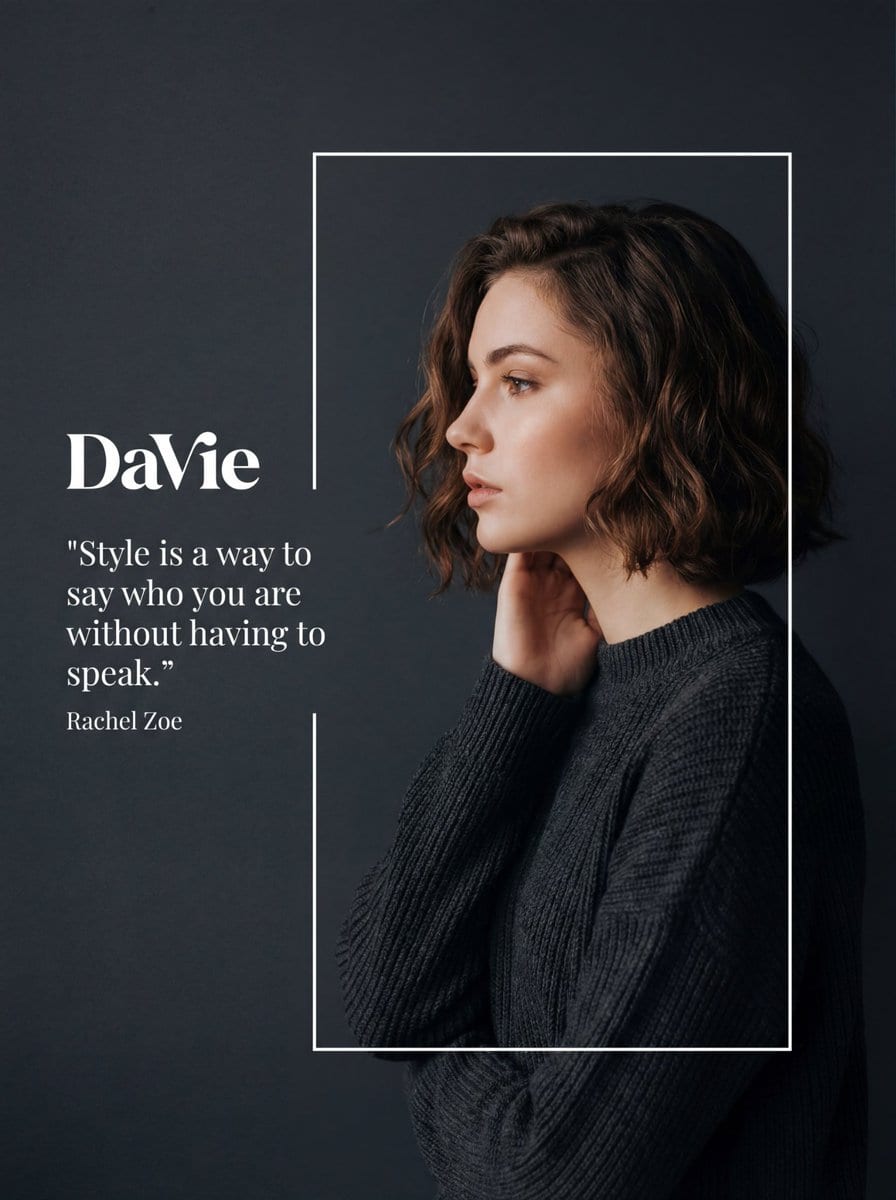
Fashion Editorial Portrait with Graphic Overlay Prompt - AI Generated Character Style Image
유사 이미지 생성

This prompt is optimized for Nano-banana-pro model

Fashion Editorial Portrait with Graphic Overlay Prompt

A highly detailed prompt for Nano Banana Pro to generate a fashion editorial portrait with a graphic overlay. It specifies a side-profile portrait against a dark charcoal background, framed by a thin white rectangle, with soft, moody studio lighting and w

예시 프롬프트
{ "meta": { "image_quality": "High", "image_type": "Editorial/Fashion Photography with Graphic Overlay", "resolution_estimation": "High resolution, likely 1080x1350 or similar portrait aspect ratio", "file_characteristics": { "compression_artifacts": "Low", "noise_level": "Low", "lens_type_estimation": "Portrait lens (approx 85mm), shallow depth of field simulated or real" } }, "global_context": { "scene_description": "A stylized fashion editorial composition featuring a side-profile portrait of a young woman with short, wavy brown hair. She is framed within a thin white rectangular outline against a dark, matte charcoal-grey background. To her left, outside the frame, is white typography including a logo and a quote. The lighting is soft and moody, highlighting her facial features and hair texture.", "environment_type": "Studio", "time_of_day": "Indiscernible/Controlled Studio Lighting", "weather_atmosphere": "Serene, Sophisticated, Melancholic, Elegant", "lighting": { "source": "Artificial Studio Softbox", "direction": "Front-left relative to the model (illuminating face profile) with subtle rim lighting on hair", "quality": "Soft, Diffused", "color_temperature": "Neutral to slightly warm on skin tones" }, "color_palette": { "dominant_hex_estimates": [ "#2C2F33", "#3A3D42", "#E8CBBF", "#5D4B42" ], "accent_colors": [ "#FFFFFF", "#D48C7D" ], "contrast_level": "Medium-High (due to dark background vs pale skin/white text)" } }, "composition": { "camera_angle": "Eye-level", "framing": "Medium close-up (Head and shoulders)", "depth_of_field": "Medium (Subject sharp, background uniform)", "focal_point": "The model's face in profile and the white typography", "symmetry_type": "Asymmetrical balance (Text on left, Subject on right)", "rule_of_thirds_alignment": "Model's face aligns with the right vertical third line; Text aligns with the upper-left intersection area" }, "objects": [ { "id": "obj_001", "label": "Background", "category": "Backdrop", "location": { "relative_position": "Full Frame", "bounding_box_percentage": { "x": 0.0, "y": 0.0, "width": 1.0, "height": 1.0 } }, "dimensions_relative": "Full canvas", "distance_from_camera": "Far", "pose_orientation": "Vertical plane", "material": "Matte paper or digital fill", "surface_properties": { "texture": "Smooth with very fine grain", "reflectivity": "None", "micro_details": "Uniform color", "wear_state": "New" }, "color_details": { "base_color_hex": "#2C2F33", "secondary_colors": [], "gradient_or_pattern": "Subtle vignetting or lighting falloff towards cor" } } }
AI로 생성하기

Pro Tip:

This character style prompt has been tested and optimized for best results. You can modify it slightly to customize the output while keeping the core structure intact.

AI 모델
Nano-banana-pro
제작자
Category
Character Style

자주 묻는 질문

character style 프롬프트에 대해 알아야 할 모든 것

이 character style 프롬프트는 어떻게 사용하나요?

위의 "AI로 생성하기" 버튼을 클릭하기만 하면 이 Character Style 프롬프트가 미리 입력된 AI 이미지 생성기로 이동합니다. 추가로 맞춤 설정하거나 바로 이미지를 생성할 수 있습니다. AI가 프롬프트를 해석하고 사용자의 설명에 따라 놀라운 character 비주얼을 만들어냅니다.

이 프롬프트를 특정 요구에 맞게 수정할 수 있나요?

물론입니다! 프롬프트를 복사하여 원하는 대로 자유롭게 맞춤 설정하세요. character 아트웍의 경우 스타일, 조명, 구도, 분위기 등에 대한 세부 정보를 추가해 보세요. 설명이 구체적일수록 AI가 창의적인 비전을 더 잘 이해할 수 있습니다. 더 많은 기술을 배우려면 character 프롬프트를 살펴보세요.

character style에 가장 적합한 AI 모델은 무엇인가요?

이 character 프롬프트는 Nano Banana, Flux, GPT-Image를 포함한 대부분의 최신 AI 이미지 생성기와 호환됩니다. 각 모델은 다른 측면에서 뛰어납니다. Nano Banana는 character 스타일에 탁월하고, Flux는 포토리얼리스틱한 결과물을 제공합니다.

좋은 character style 프롬프트란 무엇인가요?

훌륭한 character 프롬프트에는 구체적인 주제 세부사항, 아트 스타일 참조, 조명 조건(부드러운 조명, 드라마틱한 그림자), 색상 팔레트, 분위기, 기술 사양(4K, 디테일, HD) 등이 포함됩니다. 효과적인 패턴을 보려면 예시 프롬프트를 참고하세요.

이 프롬프트는 무료로 사용할 수 있나요?

네! 라이브러리에 있는 모든 프롬프트는 개인적 및 상업적 용도로 완전히 무료입니다. 제한 없이 character 아트웍을 복사, 수정, 제작하세요.

멋진 이미지를 만들 준비가 되셨나요?

이 프롬프트로 놀라운 AI 이미지 생성을 시작하거나, 방대한 프롬프트 라이브러리에서 더 많은 영감을 얻으세요.



