
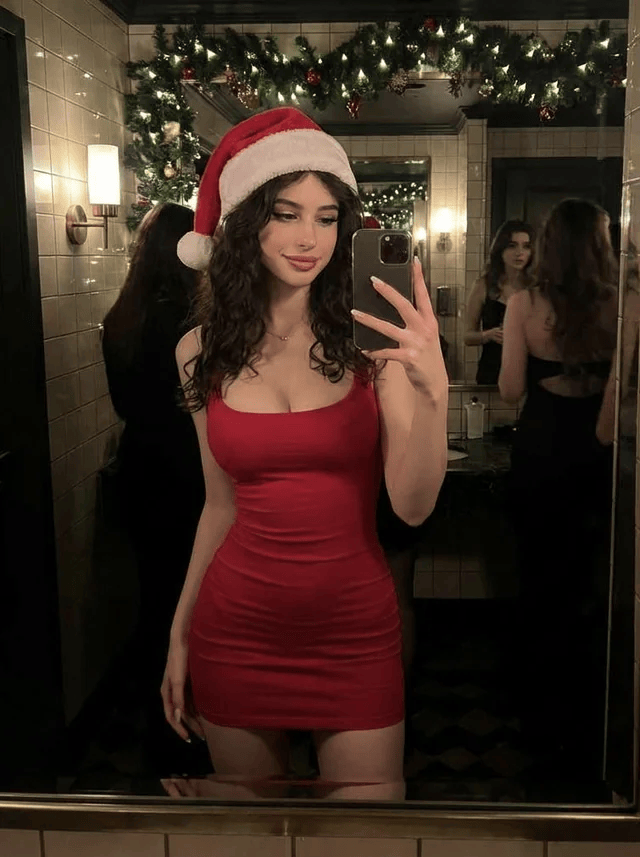
Christmas Selfie in a Decorated Bathroom Mirror

A structured prompt for generating a photorealistic mirror selfie taken by a woman in a red bodycon dress and Santa hat inside a decorated bathroom, focusing on accurate reflection physics, warm lighting, and the inclusion of background elements like garl

예시 프롬프트
{ "subject": { "primary_subject_type": "human", "count": "1 primary subject", "age_range_appearance": "adult-appearing", "gender_presentation": "feminine-presenting", "skin_tone_or_material": "light to medium skin tone", "visibility": "full body mostly visible from head to mid-thigh", "hair": { "color": "dark brown or black", "style": "loose curls/waves", "length": "long, past shoulders", "parting": "center or slightly off-center" }, "face": { "expression": "neutral to slight smile", "gaze_direction": "toward smartphone screen or mirror", "visibility": "fully visible" }, "body": { "build": "slim", "posture": "standing upright", "torso_visibility": "fully visible", "limb_visibility": "both arms visible, legs visible to mid-thigh" }, "pose": { "stance": "facing mirror/front-facing to camera via reflection", "torso_angle": "very slight angle, mostly straight on", "head_angle": "slightly tilted", "arm_positions": "one arm bent upward holding phone near face/chest; other arm relaxed down by side", "hand_positions": "one hand gripping smartphone; other hand relaxed with fingers slightly curved", "weight_distribution": "unknown" }, "clothing": { "top": { "type": "sleeveless dress bodice", "color": "{argument name=\"dress color\" default=\"red\"}", "fit": "tight/ bodycon", "coverage": "shoulders and arms uncovered", "details": "simple, no visible patterns" }, "bottom": { "type": "dress skirt (part of single-piece dress)", "color": "red", "fit": "tight/ bodycon", "coverage": "extends to upper thigh", "details": "simple, no slit visible" }, "footwear": "not visible", "other_items": "none" }, "accessories": ["{argument name=\"accessory\" default=\"red and white Santa hat\"}"], "props_interacted_with": ["smartphone"] }, "environment": { "setting_type": "bathroom or restroom with decorative elements", "indoor_or_outdoor": "indoor", "depth_description": "foreground is mirror frame area; subject appears in mirror; background contains decorated wall and additional people", "foreground_objects": ["mirror surface", "lower edge of mirror frame"], "midground_objects": ["primary subject reflection"], "background_objects": ["green garland with lights above mirror", "wall-mounted light sconce on left", "tiled walls", "doorway or dark opening", "two other feminine-presenting people in dark clothing"], "textures_or_materials": "glossy ceramic tiles, reflective glass mirror, soft greenery with small lights", "notable_layout_relationships": "garland runs horizontally across top of mirror; light sconce mounted on tiled wall to left of mirror; other people are reflected further back behind subject" }, "lighting": { "lighting_type": "mixed ambient and artificial indoor lighting", "light_direction": "multiple sources including overhead/garland lights and a wall sconce to the left", "intensity": "moderate", "color_temperature": "warm", "shadow_behavior": "soft shadows with gentle falloff", "reflections_or_glare": "mirror reflection of subject and background; mild specular reflections from tiles and mirror" }, "camera": "{argument name=\"camera type\" default=\"smartphone\"}" }
AI로 생성하기
AI 모델
Nano-banana-pro
제작자

자주 묻는 질문

realistic style 프롬프트에 대해 알아야 할 모든 것

이 realistic style 프롬프트는 어떻게 사용하나요?

위의 "AI로 생성하기" 버튼을 클릭하기만 하면 이 Realistic Style 프롬프트가 미리 입력된 AI 이미지 생성기로 이동합니다. 추가로 맞춤 설정하거나 바로 이미지를 생성할 수 있습니다. AI가 프롬프트를 해석하고 사용자의 설명에 따라 놀라운 realistic 비주얼을 만들어냅니다.

이 프롬프트를 특정 요구에 맞게 수정할 수 있나요?

물론입니다! 프롬프트를 복사하여 원하는 대로 자유롭게 맞춤 설정하세요. realistic 아트웍의 경우 스타일, 조명, 구도, 분위기 등에 대한 세부 정보를 추가해 보세요. 설명이 구체적일수록 AI가 창의적인 비전을 더 잘 이해할 수 있습니다. 더 많은 기술을 배우려면 realistic 프롬프트를 살펴보세요.

realistic style에 가장 적합한 AI 모델은 무엇인가요?

이 realistic 프롬프트는 Nano Banana, Flux, GPT-Image를 포함한 대부분의 최신 AI 이미지 생성기와 호환됩니다. 각 모델은 다른 측면에서 뛰어납니다. Nano Banana는 realistic 스타일에 탁월하고, Flux는 포토리얼리스틱한 결과물을 제공합니다.

좋은 realistic style 프롬프트란 무엇인가요?

훌륭한 realistic 프롬프트에는 구체적인 주제 세부사항, 아트 스타일 참조, 조명 조건(부드러운 조명, 드라마틱한 그림자), 색상 팔레트, 분위기, 기술 사양(4K, 디테일, HD) 등이 포함됩니다. 효과적인 패턴을 보려면 예시 프롬프트를 참고하세요.

이 프롬프트는 무료로 사용할 수 있나요?

네! 라이브러리에 있는 모든 프롬프트는 개인적 및 상업적 용도로 완전히 무료입니다. 제한 없이 realistic 아트웍을 복사, 수정, 제작하세요.

More Prompts ➜
HUD battle power overlay for any character image - AI Image Prompt
HUD battle power overlay for any character image
A two-part setup: a first line to set the HUD color and a core task prompt that overlays a full-screen scouter-style analysis HUD with a battle power value chosen by Nano Banana Pro from the image’s impression.
by てんねん
Generate detailed construction plan of Laxmi Vilas Palace from image - AI Image Prompt
Generate detailed construction plan of Laxmi Vilas Palace from image
Prompt to create a highly detailed original architectural construction plan of Laxmi Vilas Palace based on a provided image.
by Dhruv
Map of places to visit - AI Image Prompt
Map of places to visit
Generates a map-style image highlighting locations the model suggests, great for travel inspiration visuals.
by Stas Kulesh
Instagram-style Japanese handwritten cosmetic ad - AI Image Prompt
Instagram-style Japanese handwritten cosmetic ad
A detailed Japanese prompt to create an Instagram-like organic handwritten text ad for a sensitive-skin cosmetic serum, using purple and pink colors and strong first-time discount messaging.
by 杉山善則 | アド.com | エンジニア経営者
Seq2seq paper infographic - AI Image Prompt
Seq2seq paper infographic
A high-level academic prompt for generating an infographic that explains the sequence-to-sequence paper, useful for ML teaching or talks.
by Quoc Le
2000s Film Camera Style Photo - AI Image Prompt
2000s Film Camera Style Photo
A simple style modifier prompt instructing GPT Image 1.5 to render the output image in the aesthetic of a 2000s film camera photo.
by a2/acc

멋진 이미지를 만들 준비가 되셨나요?

이 프롬프트로 놀라운 AI 이미지 생성을 시작하거나, 방대한 프롬프트 라이브러리에서 더 많은 영감을 얻으세요.

지금 생성하기 모든 프롬프트 둘러보기



