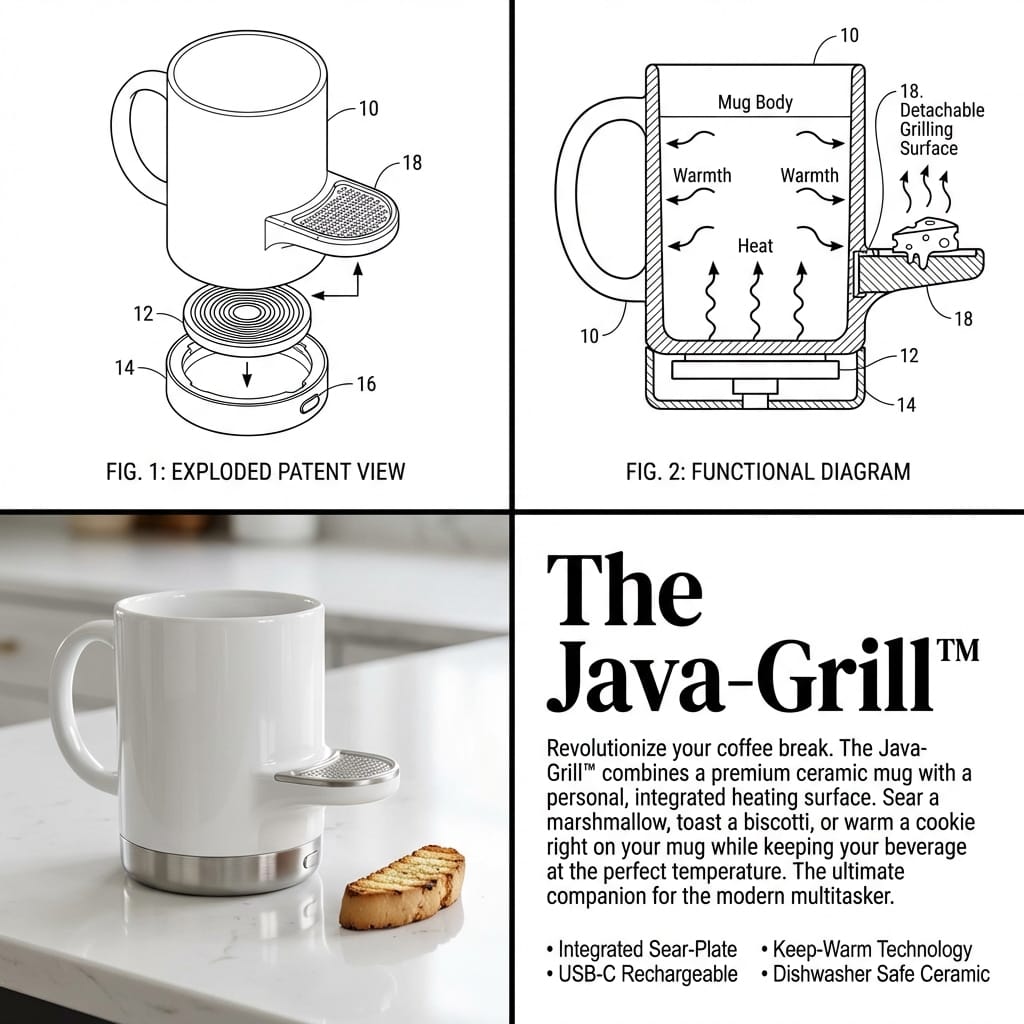
2x2 Grid Product Invention Visualization (Patent/Marketing) - AI Generated AI Art Style Image
유사 이미지 생성

This prompt is optimized for Nano-banana-pro model

2x2 Grid Product Invention Visualization (Patent/Marketing)

A complex, multi-panel prompt designed to visualize the invention and marketing of a new product by combining two concepts (or evolving one). It mandates a 2x2 grid structure, with each quadrant requiring a distinct visual style: technical line art (Explo

예시 프롬프트
Input Variable: {argument name="input objects" default="[INSERT 1 or 2 OBJECTS]"} Instruction: Act as a Visionary Industrial Designer and Patent Clerk. Create a 2x2 Grid visualizing the invention of a new product based on the Input. Innovation Logic : Analyze Functions: Identify the primary utility of Input A and Input B. The Fusion: Combine them into a single, cohesive device that solves a specific (niche) problem. If 2 Inputs: Hybridize them (e.g., Mug + Grater = A self-cooling mug with a garnish shaver). If 1 Input: Evolve it (e.g., Toothbrush = A self-sanitizing, toothpaste-injecting smart wand). The Branding: Generate a catchy, corporate product name (e.g., "The Breeze-Grate™", "Solar-Brella Pro"). The Visual Structure (The 2x2 Grid): CRITICAL: The image must be split into 4 distinct quadrants with different visual styles. Panel 1 (Top Left): The Exploded Patent View Style: Black & White Technical Line Art. Thin distinct lines, no shading. Content: An isometric "Exploded View" of the device, showing the internal motor, battery, or mechanism separated from the shell. Detail: Add Numbered Leader Lines (10, 12, 14) pointing to specific parts. Panel 2 (Top Right): The Functional Diagram Style: Black & White Schematic with bold arrows. Content: A cross-section or "In-Use" drawing showing how how the device works. Use Action Arrows to show airflow, rotation, or liquid movement. Detail: Show the "Result" (e.g., cheese falling, water spraying). Panel 3 (Bottom Left): The Product Render Style: High-End Studio Photography. Color, Glossy, "Apple/Braun" Design Aesthetic. Content: The final physical product sitting on a white reflective surface. It should look sleek, using materials like White Ceramic, Brushed Aluminum, or Matte Plastic. Context: Include a small prop to show scale (e.g., a block of cheese, a coffee bean, a hand). Panel 4 (Bottom Right): The Marketing Pitch Style: Editorial Magazine Layout. White background, black text. Typography: Headline: Large, Bold Serif Text displaying the [Invention Name]. Body: A block of clean "Lorem Ipsum" or readable text describing the "Revolutionary Features." Bullets: A small list of specs (e.g., "Dishwasher Safe," "USB-C"). Visual Syntax: Cohesion: The product design in Panel 3 must perfectly match the line art in Panel 1. Design Language: Minimalist, Ergonomic, Consumer Electronics aesthetic. Even if the idea is silly, the design must look expensive. Output: 2x2 Grid, Mixed Media (Line Art vs. Photorealism), 8k Resolution, "Kickstarter Campaign" Aesthetic.
AI로 생성하기

Pro Tip:

This ai art style prompt has been tested and optimized for best results. You can modify it slightly to customize the output while keeping the core structure intact.

AI 모델
Nano-banana-pro
제작자
Category
AI Art Style

자주 묻는 질문

ai art style 프롬프트에 대해 알아야 할 모든 것

이 ai art style 프롬프트는 어떻게 사용하나요?

위의 "AI로 생성하기" 버튼을 클릭하기만 하면 이 AI Art Style 프롬프트가 미리 입력된 AI 이미지 생성기로 이동합니다. 추가로 맞춤 설정하거나 바로 이미지를 생성할 수 있습니다. AI가 프롬프트를 해석하고 사용자의 설명에 따라 놀라운 ai art 비주얼을 만들어냅니다.

이 프롬프트를 특정 요구에 맞게 수정할 수 있나요?

물론입니다! 프롬프트를 복사하여 원하는 대로 자유롭게 맞춤 설정하세요. ai art 아트웍의 경우 스타일, 조명, 구도, 분위기 등에 대한 세부 정보를 추가해 보세요. 설명이 구체적일수록 AI가 창의적인 비전을 더 잘 이해할 수 있습니다. 더 많은 기술을 배우려면 ai art 프롬프트를 살펴보세요.

ai art style에 가장 적합한 AI 모델은 무엇인가요?

이 ai art 프롬프트는 Nano Banana, Flux, GPT-Image를 포함한 대부분의 최신 AI 이미지 생성기와 호환됩니다. 각 모델은 다른 측면에서 뛰어납니다. Nano Banana는 ai art 스타일에 탁월하고, Flux는 포토리얼리스틱한 결과물을 제공합니다.

좋은 ai art style 프롬프트란 무엇인가요?

훌륭한 ai art 프롬프트에는 구체적인 주제 세부사항, 아트 스타일 참조, 조명 조건(부드러운 조명, 드라마틱한 그림자), 색상 팔레트, 분위기, 기술 사양(4K, 디테일, HD) 등이 포함됩니다. 효과적인 패턴을 보려면 예시 프롬프트를 참고하세요.

이 프롬프트는 무료로 사용할 수 있나요?

네! 라이브러리에 있는 모든 프롬프트는 개인적 및 상업적 용도로 완전히 무료입니다. 제한 없이 ai art 아트웍을 복사, 수정, 제작하세요.

더 많은 프롬프트 탐색 ➜

영감 얻기: 이 AI 프롬프트를 사용해보세요

창의성을 자극하는 엄선된 AI 프롬프트. "지금 사용해보기"를 클릭하여 유사한 이미지를 즉시 생성하세요!

Editorial Street-Fashion Portrait Prompt - AI Generated Character Style Image Example
Editorial Street-Fashion Portrait Prompt
A prompt for generating a hyper-realistic, cinematic full-body portrait of a stylish young man in an...
by The Prompt Engineer
Character Style
Flight Attendant on Private Jet (Duplicate) - AI Generated Realistic Style Image Example
Flight Attendant on Private Jet (Duplicate)
A detailed prompt using a mix of natural language and parenthetical weights to generate a raw, ultra...
by jennieee:3
Realistic Style
Model Walking Down Runway Prompt - AI Generated Realistic Style Image Example
Model Walking Down Runway Prompt
A simple prompt used to compare image generation models, instructing the AI to create a photo of a m...
by Yana Welinder
Realistic Style
Japanese Festival Mikoshi Float Prompt Template - AI Generated Character Style Image Example
Japanese Festival Mikoshi Float Prompt Template
A Japanese prompt template for Nano Banana Pro designed to place a user's character onto a giant fes...
by とすくん
Character Style
Photorealistic render from illustration - AI Generated Realistic Style Image Example
Photorealistic render from illustration
An English prompt for converting an illustration into a highly detailed, cinematic, photorealistic i...
by 直人 【コンシェルジュ民泊】
Realistic Style
Presentation slide about PLM and digital thread - AI Generated AI Art Style Image Example
Presentation slide about PLM and digital thread
A Japanese business prompt that first asks the model to think through key messages about PLM systems...
by PLM_Guy
AI Art Style

더 많은 프롬프트 아이디어가 필요하신가요?

애니메이션, 사실적, 추상 등 여러 카테고리에 걸친 {count}+ AI 프롬프트의 방대한 라이브러리를 둘러보세요!

모든 프롬프트 둘러보기

멋진 이미지를 만들 준비가 되셨나요?

이 프롬프트로 놀라운 AI 이미지 생성을 시작하거나, 방대한 프롬프트 라이브러리에서 더 많은 영감을 얻으세요.