
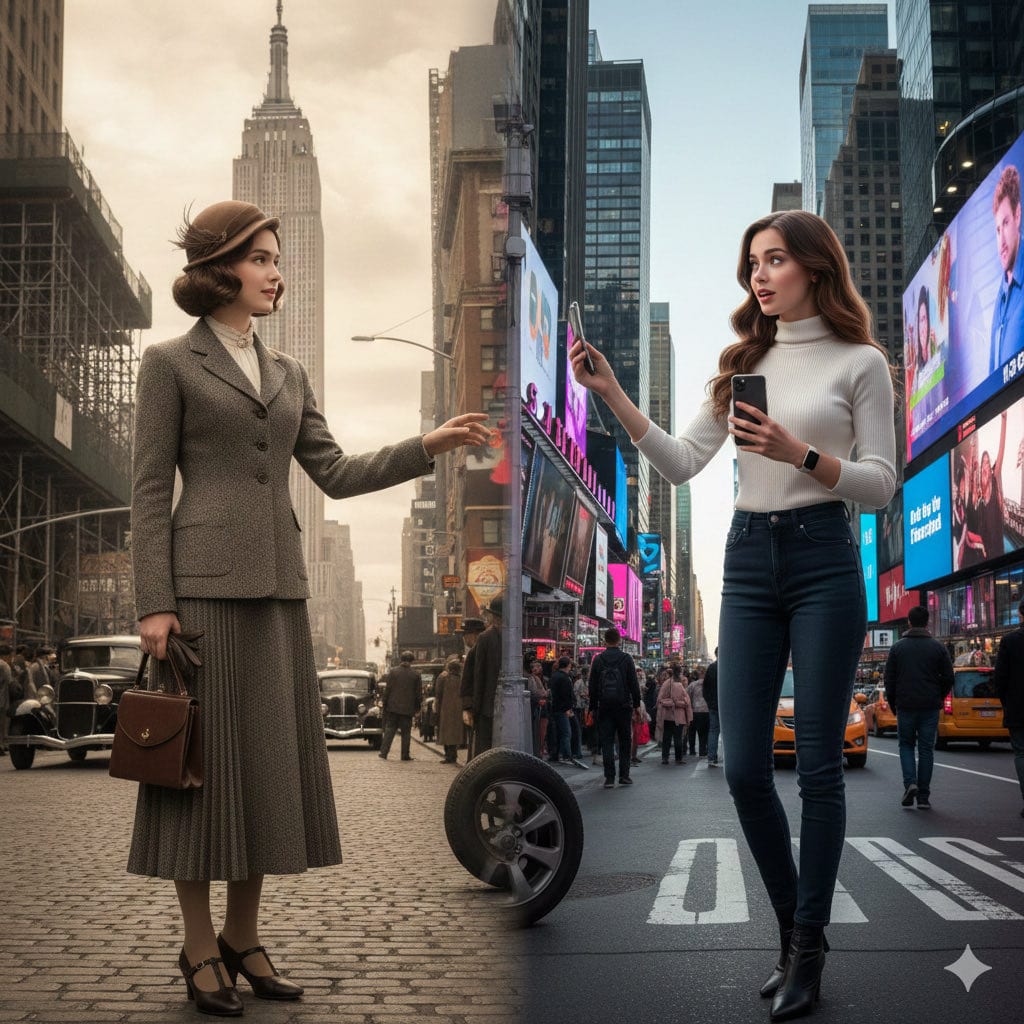
Split-Screen Cinematic Time Travel Prompt - AI Generated Character Style Image
類似画像を生成

This prompt is optimized for Nano-banana-pro model

Split-Screen Cinematic Time Travel Prompt

A detailed cinematic prompt template for Nano Banana Pro designed to create a photorealistic split-screen image showing the same person in two different historical eras, seamlessly blending the environments and ensuring face consistency based on a referen

プロンプト例
A realistic split-screen cinematic shot of {argument name="Scene" default="Scene"}, showing the same {argument name="Gender" default="Gender"} appearing in two different eras: {argument name="Era A" default="Era_A"} on the left and {argument name="Era B" default="Era_B"} on the right. If a reference image is uploaded, match her or his exact face, including facial features, hairstyle, hair accessories, skin tone, and body shape. Left side ({argument name="Era A" default="Era_A"}): The {argument name="Gender" default="Gender"} appears fully visible (face + upper body). She or his wears clothing, hairstyle, and accessories authentic to {argument name="Era A" default="Era_A"}, fitting the historical setting. Environment, architecture, materials, vehicles, props and lighting must all belong to {argument name="Era A" default="Era_A"}. Atmosphere feels nostalgic and historically accurate. Right side ({argument name="Era B" default="Era_B"}): The same {argument name="Gender" default="Gender"} (same age, same face, same body proportions) appears fully visible (face + upper body) in {argument name="Era B" default="Era_B"}. She or he wears contemporary or era-appropriate fashion from {argument name="Era B" default="Era_B"}, with matching modern props, technology, surroundings, and lighting. Center area: The two eras merge organically, with no hard dividing line. Architectural elements, clothing textures, and props subtly transition from old to new. The {Gender} in each era may glance toward the other side, creating a sense of time-travel and self-encounter. Photorealistic, cinematic lighting, ultra-detailed textures, high realism, 8k quality. Aspect Ratio: {argument name="Aspect Ratio" default="Aspect_Ratio"} --- Scene: {argument name="example scene" default="NewYork street"} Gender:{argument name="example gender" default="Girl"} Era_A: {argument name="example era A" default="1930s Empire State Building"} Era_B: {argument name="example era B" default="Modern Times Square"} Aspect_Ratio: {argument name="example aspect ratio" default="4:7"}
AIで生成

Pro Tip:

This character style prompt has been tested and optimized for best results. You can modify it slightly to customize the output while keeping the core structure intact.

AIモデル
Nano-banana-pro
作者
Category
Character Style

よくある質問

character styleプロンプトについて知っておくべきことすべて

このcharacter styleプロンプトはどうやって使うのですか?

上の「AIで生成」ボタンをクリックするだけで、このCharacter Styleプロンプトが入力済みのAI画像生成ツールに移動します。さらにカスタマイズしたり、直接画像を生成したりできます。私たちのAIがプロンプトを解釈し、あなたの説明に基づいて素晴らしいcharacterビジュアルを作成します。

このプロンプトを自分の特定のニーズに合わせて変更できますか?

もちろんです!プロンプトをコピーして、あなたのビジョンに合わせて自由にカスタマイズしてください。characterアート作品の場合は、スタイル、照明、構図、雰囲気などの詳細を追加してみてください。より具体的に説明するほど、AIがあなたの創造的なビジョンを理解しやすくなります。私たちのcharacterプロンプトを閲覧して、さらなるテクニックを学びましょう。

character styleにはどのAIモデルが最適ですか?

このcharacterプロンプトは、Nano Banana、Flux、GPT-Imageなど、最新のAI画像生成ツールのほとんどで動作します。モデルによって得意分野が異なり、Nano Bananaはcharacterスタイルに優れ、Fluxはフォトリアルな結果を提供します。

良いcharacter styleプロンプトとはどのようなものですか?

優れたcharacterプロンプトには、具体的な被写体の詳細、アートスタイルの参考、照明条件(柔らかな光、劇的な影)、カラーパレット、雰囲気、技術仕様(4K、詳細、HD)などが含まれます。効果的なパターンを確認するには、サンプルプロンプトを研究してください。

このプロンプトは無料で使えますか?

はい!ライブラリ内のすべてのプロンプトは、個人用・商用ともに完全に無料です。制限なく、characterアート作品をコピー、変更、作成していただけます。

素晴らしい画像を作成する準備はできましたか?

このプロンプトを使って素晴らしいAI画像の生成を始めるか、豊富なプロンプトライブラリを探索してさらなるインスピレーションを得てください。



