
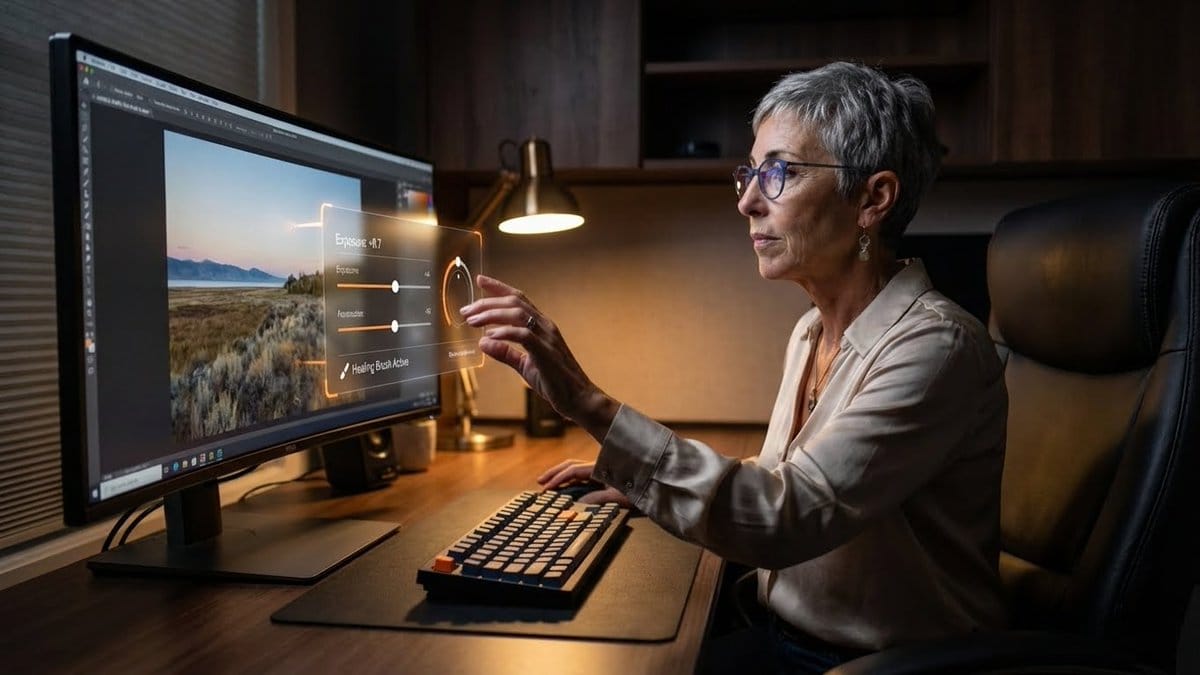
Professional Photo Editor HUD Prompt - AI Generated Realistic Style Image
類似画像を生成

This prompt is optimized for Nano-banana-pro model

Professional Photo Editor HUD Prompt

A detailed JSON prompt for Nano Banana Pro to generate an image of a professional photo editor at a dark academia-style workstation. The key feature is a floating, 'in-air' professional-grade Heads-Up Display (HUD) for editing controls, which the subject

プロンプト例
{ "promptDetails": { "description": "A professional photo editor at their workstation, interacting with a floating, 'in-air' professional grade Heads-Up Display for editing controls.", "styleTags": [ "Desk Setup Aesthetic", "Dark Academia (Modern)", "High Resolution Detail", "Productivity" ] }, "scene": { "background": { "setting": "A dedicated, professional editing suite/desk setup", "details": "An ultra-wide, color-calibrated monitor (showing a sample photo), a mechanical keyboard, a large, comfortable chair, dark wooden desk surface, and soft ambient lighting." }, "subject": { "description": "The person defined by `[UPLOADED IMAGE]`, wearing business-casual attire, eyes focused on the screen/overlay.", "pose": "Sitting in front of the monitor, one hand extended in front of the screen, subtly manipulating the floating UI with their fingers.", "focus": "The subject and the floating UI/tools are sharply defined." } }, "overlayObject": { "type": "In-Air Professional Editing Control Panel", "relationshipToEnvironment": "A complex control panel floating between the subject's hand and the monitor, with sliders and dials.", "transform": "The panel is slightly curved to feel ergonomic, 3D graphic design.", "surfaceInteraction": "Transparent black background with bright, glowing orange and white vector controls (like 'Exposure', 'Contrast', 'Highlights').", "components": { "control": "Exposure Slider: +0.7", "toolActive": "Healing Brush", "position": "Floating just above the keyboard area." } }, "technicalStyle": { "aspectRatio": "16:9 (Landscape)", "photographyStyle": "Commercial/Setup, Low-Key", "camera": { "shotType": "Medium Shot/Wide Shot (to capture the setup)", "angle": "Slightly side-on, capturing the subject's profile and the monitor's glow.", "depthOfField": "Deep, to show off the entire desk setup as a product shot." }, "lighting": { "type": "Screen Glow and Desk Lamp", "description": "Cool-white light from the monitor acting as the main fill, with a warm, subtle desk lamp providing accent lighting." }, "color": { "palette": "Deep grays, blacks, dark woods, and the saturated colors of the digital tools." } } }
AIで生成

Pro Tip:

This realistic style prompt has been tested and optimized for best results. You can modify it slightly to customize the output while keeping the core structure intact.

AIモデル
Nano-banana-pro
Category
Realistic Style

よくある質問

realistic styleプロンプトについて知っておくべきことすべて

このrealistic styleプロンプトはどうやって使うのですか?

上の「AIで生成」ボタンをクリックするだけで、このRealistic Styleプロンプトが入力済みのAI画像生成ツールに移動します。さらにカスタマイズしたり、直接画像を生成したりできます。私たちのAIがプロンプトを解釈し、あなたの説明に基づいて素晴らしいrealisticビジュアルを作成します。

このプロンプトを自分の特定のニーズに合わせて変更できますか?

もちろんです!プロンプトをコピーして、あなたのビジョンに合わせて自由にカスタマイズしてください。realisticアート作品の場合は、スタイル、照明、構図、雰囲気などの詳細を追加してみてください。より具体的に説明するほど、AIがあなたの創造的なビジョンを理解しやすくなります。私たちのrealisticプロンプトを閲覧して、さらなるテクニックを学びましょう。

realistic styleにはどのAIモデルが最適ですか?

このrealisticプロンプトは、Nano Banana、Flux、GPT-Imageなど、最新のAI画像生成ツールのほとんどで動作します。モデルによって得意分野が異なり、Nano Bananaはrealisticスタイルに優れ、Fluxはフォトリアルな結果を提供します。

良いrealistic styleプロンプトとはどのようなものですか?

優れたrealisticプロンプトには、具体的な被写体の詳細、アートスタイルの参考、照明条件(柔らかな光、劇的な影)、カラーパレット、雰囲気、技術仕様(4K、詳細、HD)などが含まれます。効果的なパターンを確認するには、サンプルプロンプトを研究してください。

このプロンプトは無料で使えますか?

はい!ライブラリ内のすべてのプロンプトは、個人用・商用ともに完全に無料です。制限なく、realisticアート作品をコピー、変更、作成していただけます。

素晴らしい画像を作成する準備はできましたか?

このプロンプトを使って素晴らしいAI画像の生成を始めるか、豊富なプロンプトライブラリを探索してさらなるインスピレーションを得てください。



