
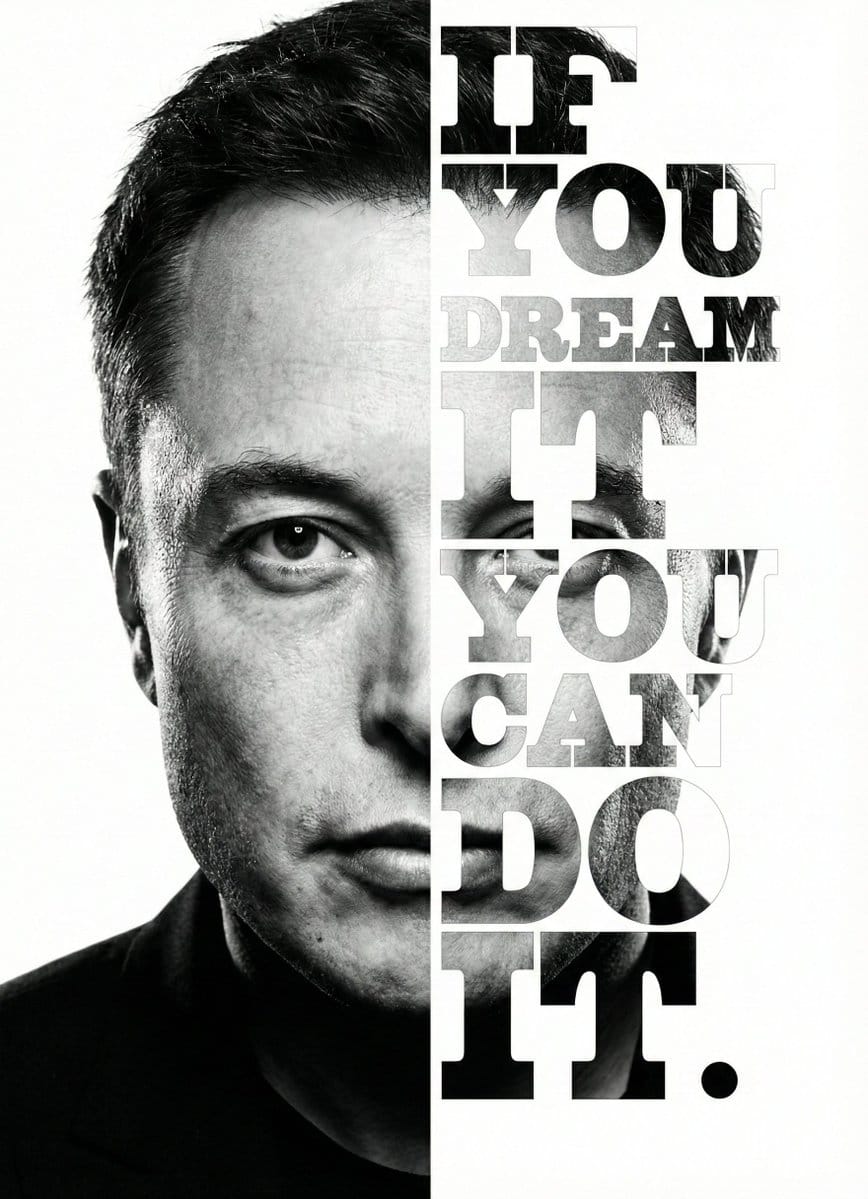
Elon Musk Typographic Split Portrait

A highly detailed prompt for a digital composite/graphic design image featuring a high-contrast, black and white split-composition portrait of Elon Musk. The left side is a realistic photograph, while the right side is replaced by large, vertically stacke

Exemple de prompt
{ "meta": { "image_quality": "High", "image_type": "Digital Composite / Graphic Design", "resolution_estimation": "High resolution vertical poster format", "file_characteristics": { "compression_artifacts": "Low", "noise_level": "Low (film grain visible in photo texture)", "lens_type_estimation": "Telephoto (suggested by facial compression)" } }, "global_context": { "scene_description": "A high-contrast, black and white split-composition portrait of {argument name="subject name" default="Elon Musk"}. The left half of the image displays a realistic, high-detail photograph of the right side of his face (viewer's left). The right half of the image consists of a white background where the left side of his face (viewer's right) is revealed only through the shapes of large, bold, vertically stacked serif typography reading '{argument name="quote" default="IF YOU DREAM IT YOU CAN DO IT."}'", "environment_type": "Studio/Graphic Art", "time_of_day": "Indiscernible", "weather_atmosphere": "Visionary, Motivational, Intense", "lighting": { "source": "Artificial Studio Lighting", "direction": "Side lighting (lighting the face from the left)", "quality": "Hard, dramatic chiaroscuro", "color_temperature": "Monochrome (Black and White)" }, "color_palette": { "dominant_hex_estimates": [ "#FFFFFF", "#000000", "#333333", "#888888" ], "accent_colors": [], "contrast_level": "High" } }, "composition": { "camera_angle": "Eye-level", "framing": "Close-up portrait", "depth_of_field": "Deep (all elements in focus)", "focal_point": "Subject's eyes and the typographic message", "symmetry_type": "Vertical Split Asymmetry", "rule_of_thirds_alignment": "The split occurs roughly along the vertical center line of the face (nose bridge)" }, "objects": [ { "id": "obj_subject_face", "label": "Elon Musk (Face)", "category": "Person", "location": { "relative_position": "Left half of canvas", "bounding_box_percentage": { "x": 0.0, "y": 0.0, "width": 0.5, "height": 1.0 } }, "dimensions_relative": "Large (fills height)", "distance_from_camera": "Close-up", "pose_orientation": "Front-facing, slight tilt, intense contemplative gaze", "material": "Skin/Biological", "surface_properties": { "texture": "Smooth skin, faint stubble, characteristic facial structure", "reflectivity": "Low (natural skin oil sheen on nose/cheek)", "micro_details": "Faint crow's feet, straight/wavy hair texture visible at top", "wear_state": "N/A" }, "color_details": { "base_color_hex": "#808080", "secondary_colors": [ "#000000", "#FFFFFF" ], "gradient_or_pattern": "Grayscale continuous tone" }, "interaction_with_light": {
Générer avec l'IA
Modèle d'IA
Nano-banana-pro
Auteur

Questions fréquentes

Tout ce que vous devez savoir sur les prompts character style

Comment utiliser ce prompt character style ?

Cliquez simplement sur le bouton "Générer avec l'IA" ci-dessus, et vous serez redirigé vers notre générateur d'images IA avec ce prompt Character Style pré-rempli. Vous pouvez le personnaliser davantage ou générer des images directement. Notre IA interprétera le prompt et créera de superbes visuels character basés sur votre description.

Puis-je modifier ce prompt pour mes besoins spécifiques ?

Absolument ! N'hésitez pas à copier le prompt et à le personnaliser selon votre vision. Pour les œuvres d'art character, essayez d'ajouter des détails sur le style, l'éclairage, la composition ou l'ambiance. Plus vous êtes descriptif, mieux l'IA pourra comprendre votre vision créative. Parcourez nos prompts character pour apprendre plus de techniques.

Quels modèles d'IA fonctionnent le mieux pour character style ?

Ce prompt character fonctionne avec la plupart des générateurs d'images IA modernes, y compris Nano Banana, Flux et GPT-Image. Différents modèles excellent dans différents aspects - Nano Banana est excellent pour les styles character, tandis que Flux offre des résultats photoréalistes.

Qu'est-ce qui fait un bon prompt character style ?

Les excellents prompts character incluent : des détails spécifiques sur le sujet, des références de style artistique, des conditions d'éclairage (lumière douce, ombres dramatiques), une palette de couleurs, une ambiance/atmosphère et des spécifications techniques (4K, détaillé, HD). Étudiez nos exemples de prompts pour voir des modèles efficaces.

Ce prompt est-il gratuit ?

Oui ! Tous les prompts de notre bibliothèque sont entièrement gratuits pour un usage personnel et commercial. Copiez, modifiez et créez d'étonnantes œuvres d'art character sans aucune restriction.

More Prompts ➜
Four-panel manga about Bitcoin from cypherpunk view - AI Image Prompt
Four-panel manga about Bitcoin from cypherpunk view
Generates a Japanese four-panel manga where a reference character explains the origins of Bitcoin from a cypherpunk perspective.
by TKtokyo
Technical drawing of a speaker from reference - AI Image Prompt
Technical drawing of a speaker from reference
A concise prompt to transform a photo of a speaker into a clean technical drawing, useful for product documentation or design work.
by Linus ✦ Ekenstam
Generate an image in the style of a given moodboard - AI Image Prompt
Generate an image in the style of a given moodboard
A style-transfer prompt that asks the model to create a new image matching the visual style of an uploaded moodboard.
by Misch Strotz
Convert videogame screenshot to hyperreal modern engine - AI Image Prompt
Convert videogame screenshot to hyperreal modern engine
A prompt for transforming an existing videogame screenshot into a hyper-realistic, modern game engine render while preserving composition.
by Kiaran Ritchie
Chinese poetic and crossover character prompts - AI Image Prompt
Chinese poetic and crossover character prompts
Several prompts for illustrations of poems and character mashups.
by 离谱
2x2 Catch and Cook Prompt (Screenshot) - AI Image Prompt
2x2 Catch and Cook Prompt (Screenshot)
A prompt used in a comparison test, focusing on maintaining a specific geometric shape (a bird's triangular shape) during image generation. The prompt text is visible in the accompanying screenshot.
by TechHalla

Prêt à créer des images incroyables ?

Commencez à générer de superbes images IA avec ce prompt ou explorez notre vaste bibliothèque de prompts pour plus d'inspiration.

Générer maintenant Parcourir tous les prompts



