Exemple de prompt
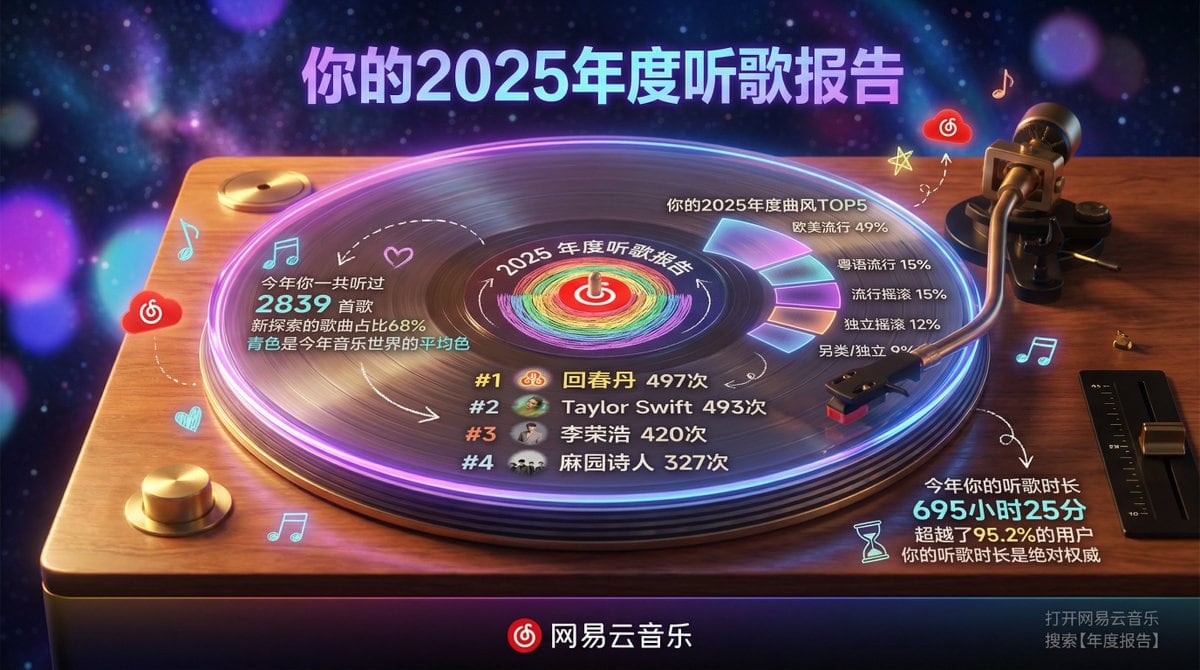
Hyper-realistic professional photography, a high-end transparent acrylic vinyl record placed on a classic turntable, slowly rotating and playing. The overall scene is set on a warm wooden turntable stand, with a dark, dreamy starry sky mixed with gradient neon lights in the background, creating a retro yet modern atmosphere. Subject - Transparent Acrylic Vinyl Record and Turntable: Record Material: Crystal clear transparent acrylic, with realistic reflections, glowing edges, and refraction effects. Classic vinyl groove textures are visible on the surface, but the whole is crystal clear. The record is rotating, with a slight motion blur.
Turntable: Retro style wooden or metal platter base, the tonearm gently rests on the record, the stylus touches the grooves, details are realistic, including the spindle and speed adjustment knob.
Content Style: Elegant modern typography combined with a slight hand-drawn feel. Text is directly “engraved” or projected onto the transparent record surface, with slightly imperfect lines.
Record Center Label Area: Circular label printed with NetEase Cloud Music's red LOGO, surrounded by the words "{argument name="report year" default="2025"} Annual Listening Report." The label rotates with the record. Content Layout (Text and elements cleverly integrated into the record surface and grooves): Top Area (Upper outer edge of the record): Large title: "Your {argument name="report year" default="2025"} Annual Listening Report" using bold modern font, with purple-blue gradient and neon purple edge glow. Center Area - Favorite Artist Ranking (occupying about 40% of the center): Central illustration: Hand-drawn style reinforcement of the center label with the iconic pattern of #1 {argument name="artist 1" default="HuiChunDan"} (rainbow gradient circle), surrounded by small avatar icons of artists like Taylor Swift and Li Ronghao, slightly dynamic with rotation. Avatar icons are sourced from the reference image.
Art Style: Simple line art with slight hand-drawn imperfections, full of personality.
Colors: Main fill in deep purple and blue tones, white outline, neon purple and orange highlights.
Artist ranking text arranged along the record grooves: #1 {argument name="artist 1" default="HuiChunDan"} 497 times, #2 Taylor Swift 493 times, #3 Li Ronghao 420 times, #4 Ma Yuan Shi Ren 327 times (Top 4), elegant glowing font, curved along the groove lines. Surrounding Information Display (Circular layout, text and icons distributed on the outer ring of the record and the turntable panel): Left Side (Left panel of the turntable) - Total Listening Volume and Style: Icons: Music note and heart.
“You listened to 2839 songs this year”
“New exploration songs accounted for 68%”
“Cyan is the average color of the music world this year”
Hand-drawn small arrow pointing to the center of the record. Top Right (Space above the record) - Annual Genre TOP 5: Icon: Flowing waveform.
“Your {argument name="report year" default="2025"} Annual Genre TOP 5”
European/American Pop 49%, Cantonese Pop 15%, Pop Rock 15%, Indie Rock 12%, Alternative/Indie 9%
Displayed using percentage circles or sector diagrams surrounding the outer edge of the record, slightly glowing. Bottom (Turntable base panel) - Listening Duration: Icons: Hourglass and play button.
“Your listening duration this year is 695 hours and 25 minutes”
“Exceeding 95.2% of users”
“Your listening duration is the absolute authority” Connecting Elements: Hand-drawn arrows and dashed lines connecting various parts of the turntable to the rotating record.
Small Decorative Elements: Scattered music notes, stars, light spots, NetEase Cloud red small clouds, slightly floating with rotation.
All text is in Chinese, elegant modern font with a slight handwritten feel. Color Scheme: Baseline: Cream white texture (#F5F5DC)
Main Illustration: Deep purple-blue gradient fill, white outline
Highlights: Neon purple (#A100FF) and orange used for emphasis and decoration
Icons and Charts: Light grey (#B0B0B0) line art
Brand Color: NetEase Cloud red (#E60026) used for LOGO and key emphasis Bottom Area (Front edge of the turntable): Dark gradient horizontal bar background
Left: NetEase Cloud Music Red LOGO (metallic glow)
Center: “NetEase Cloud Music” standard text
Right: Small text “Open NetEase Cloud Music Search 【Annual Report】” Environment and Photography: Background: Dark dreamy starry sky with purple-blue neon gradient, extremely heavy blur.
Depth of Field: f/1.4 large aperture simulation - background is almost completely abstract.
Only soft purple, blue, and pink bokeh light spots are visible, with no discernible shapes.
Perspective: Slightly overhead 45-degree frontal view, record and turntable perfectly centered, capturing rotational dynamics.
Lighting: Warm side light and professional spotlight creating strong reflections on the acrylic surface, dramatic neon purple glowing edge, subtle highlights captured on the tonearm and stylus.
Atmosphere: Nighttime retro dreamy atmosphere, transparent acrylic record glowing while spinning on the turntable, heavy background blur highlighting the main subject. Technical Specifications: 8K ultra-high resolution, cinematic color grading high contrast, realistic acrylic material physics (edge glow, reflection, refraction, slight rotational blur), exquisite modern text details, high-end music photography quality, extreme background bokeh making the record and turntable content the absolute focal point. Key requirement: Background must be extremely blurred (almost abstract bokeh), the central transparent vinyl record must have a realistic sense of rotation, elegant modern text integrated into the record surface, all elements incorporating the user-provided 2025 NetEase Cloud annual summary data, strong overall retro turntable atmosphere.
Pro Tip:
This realistic style prompt has been tested and optimized for best results. You can modify it slightly to customize the output while keeping the core structure intact.