
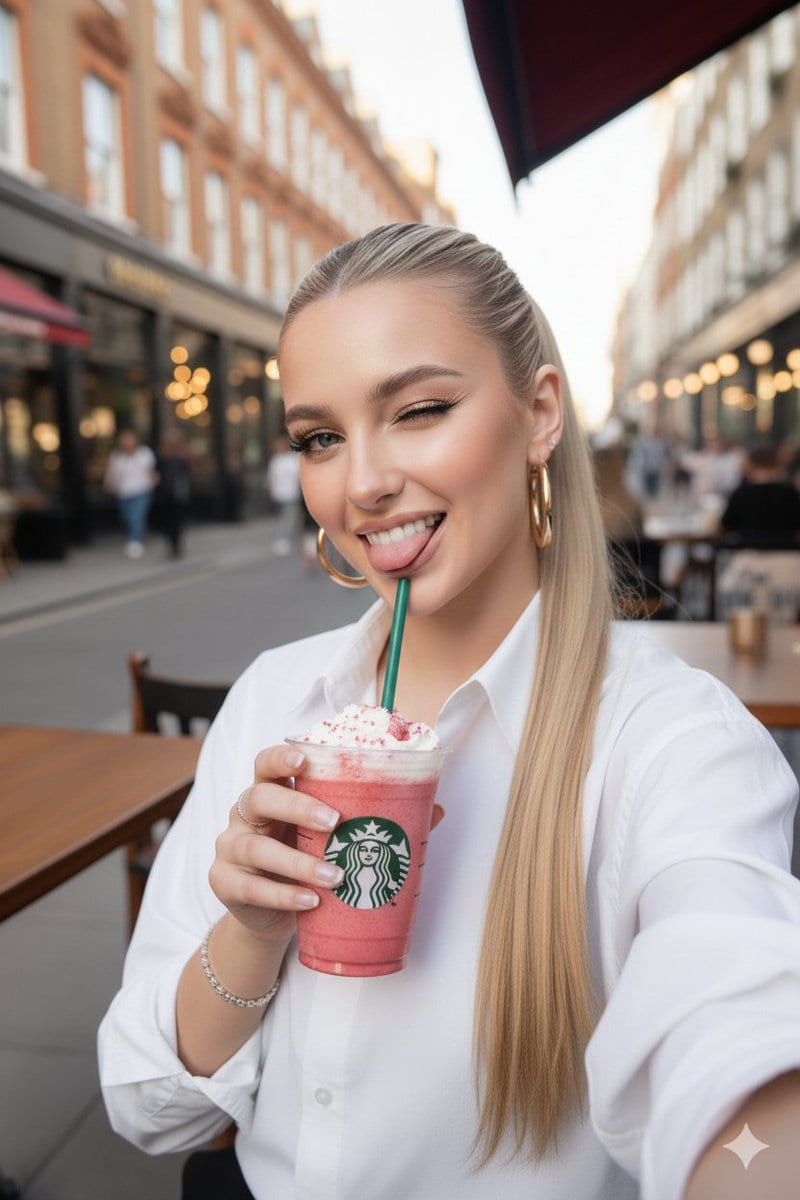
Ultra-realistic Starbucks Selfie at Golden Hour

A prompt for generating an ultra-realistic smartphone selfie of a stunning young woman sipping a pink strawberry smoothie from a Starbucks cup. It specifies detailed facial features, attire (oversized white shirt, gold hoops), and a golden hour outdoor Eu

Indicación de ejemplo
{ "prompt": "Ultra-realistic selfie of a stunning young woman in her early 20s, western beauty with perfect symmetrical facial features, flawless glowing skin, sharp defined jawline, high cheekbones, large expressive almond-shaped blue eyes with dramatic long thick eyelashes and perfect winged eyeliner, perfectly shaped arched eyebrows, full glossy nude-pink lips, subtle rosy natural blush, long straight blonde hair styled in a sleek high ponytail, wearing large shiny gold hoop earrings, delicate diamond/bling rings and bracelet, white crisp button-up shirt slightly oversized with rolled sleeves, casually sipping a thick pink strawberry smoothie/frappuccino from a tall transparent Starbucks cup with pink straw, whipped cream and pink berry chunks visible on top, cup has classic green Starbucks logo, sunny day outdoor European/London-style street cafe terrace background with wooden tables, people sitting in the distance, classic brick and glass buildings, red awnings, warm golden hour sunlight, soft natural bokeh, selfie angle from slightly above eye level with arm extended, confident and chic vibe, luxurious casual fashion, photorealistic, 8k, highly detailed skin texture and pores, sharp focus, cinematic lighting, natural shadows", "negative_prompt": "blurry, low quality, deformed face, extra limbs, bad anatomy, cartoon, anime, illustration, plastic skin, overexposed, underexposed, text, watermark, ugly, distorted proportions, closed eyes, male, elderly, child, heavy makeup overload, neon colors, dark lighting, indoor, messy hair, no earrings, different drink, winter clothing", "aspect_ratio": "9:16", "style": "photorealistic", "lighting": "natural daylight, golden hour, soft shadows", "camera": "smartphone selfie, iPhone 15 Pro style, slight wide angle", "sampling_steps": 35, "cfg_scale": 7.5, "seed": -1 }
Generar con IA
Modelo de IA
Nano-banana-pro
Autor

Preguntas frecuentes

Todo lo que necesitas saber sobre indicaciones de realistic style

¿Cómo uso esta indicación de realistic style?

Simplemente haz clic en el botón "Generar con IA" arriba, y serás llevado a nuestro generador de imágenes con IA con esta indicación de Realistic Style pre-llenada. Puedes personalizarla más o generar imágenes directamente. Nuestra IA interpretará la indicación y creará impresionantes visuales de realistic basados en tu descripción.

¿Puedo modificar esta indicación para mis necesidades específicas?

¡Por supuesto! Siéntete libre de copiar la indicación y personalizarla para que coincida con tu visión. Para obras de arte de realistic, intenta añadir detalles sobre estilo, iluminación, composición o ambiente. Cuanto más descriptivo seas, mejor podrá la IA entender tu visión creativa. Explora nuestras indicaciones de realistic para aprender más técnicas.

¿Qué modelos de IA funcionan mejor para realistic style?

Esta indicación de realistic funciona con la mayoría de los generadores de imágenes de IA modernos, incluyendo Nano Banana, Flux y GPT-Image. Diferentes modelos sobresalen en diferentes aspectos - Nano Banana es excelente para estilos realistic, mientras que Flux ofrece resultados fotorrealistas.

¿Qué hace una buena indicación de realistic style?

Las grandes indicaciones de realistic incluyen: detalles específicos del sujeto, referencias de estilo artístico, condiciones de iluminación (luz suave, sombras dramáticas), paleta de colores, ambiente/atmósfera y especificaciones técnicas (4K, detallado, HD). Estudia nuestras indicaciones de ejemplo para ver patrones efectivos.

¿Esta indicación es gratuita?

¡Sí! Todas las indicaciones en nuestra biblioteca son completamente gratuitas para uso personal y comercial. Copia, modifica y crea increíbles obras de arte de realistic sin restricciones.

More Prompts ➜
Trompe l'oeil subject stepping out of social media screen - AI Image Prompt
Trompe l'oeil subject stepping out of social media screen
A prompt to turn an uploaded subject into a trompe l'oeil illusion where they step out of a social media interface on a large screen, including UI details and emoji reactions.
by madpencil_
Shear and moment diagram for a loaded beam - AI Image Prompt
Shear and moment diagram for a loaded beam
An English engineering prompt that generates a shear and moment diagram for a simply supported beam with a uniform load.
by mjamiv⚡️
Chalk drawing of an illustration on a classroom blackboard - AI Image Prompt
Chalk drawing of an illustration on a classroom blackboard
A prompt to render an illustration as a colorful chalk drawing on a Japanese classroom blackboard, viewed from an angle, with a specific phrase written beside it.
by とらの
Japanese tourists enjoying a Taiwanese night market - AI Image Prompt
Japanese tourists enjoying a Taiwanese night market
An English prompt to generate a realistic photo-like image of Japanese people traveling in Taiwan and enjoying the night market, with Chinese text rendered correctly.
by Kuu?
Create a Realistic Photo of Her (Iterative Refinement) - AI Image Prompt
Create a Realistic Photo of Her (Iterative Refinement)
An iterative prompt sequence used to refine an image generation result, starting with a request for a realistic photo and then demanding even greater realism with specific details like skin texture, emphasizing a non-artistic, human look.
by Roi Lee
Dual-Style Artistic Sketch with Embroidery and Ballpoint Pen Textures - AI Image Prompt
Dual-Style Artistic Sketch with Embroidery and Ballpoint Pen Textures
A highly specific artistic prompt combining the textures of hand embroidery and rough ballpoint pen sketching. It requires strict adherence to a reference image's form and mood, using only deep indigo lines on a high-definition off-white linen canvas text
by custom

¿Listo para crear imágenes increíbles?

Empieza a generar impresionantes imágenes con IA usando esta indicación o explora nuestra extensa biblioteca de indicaciones para más inspiración.

Generar ahora Explorar todas las indicaciones



