
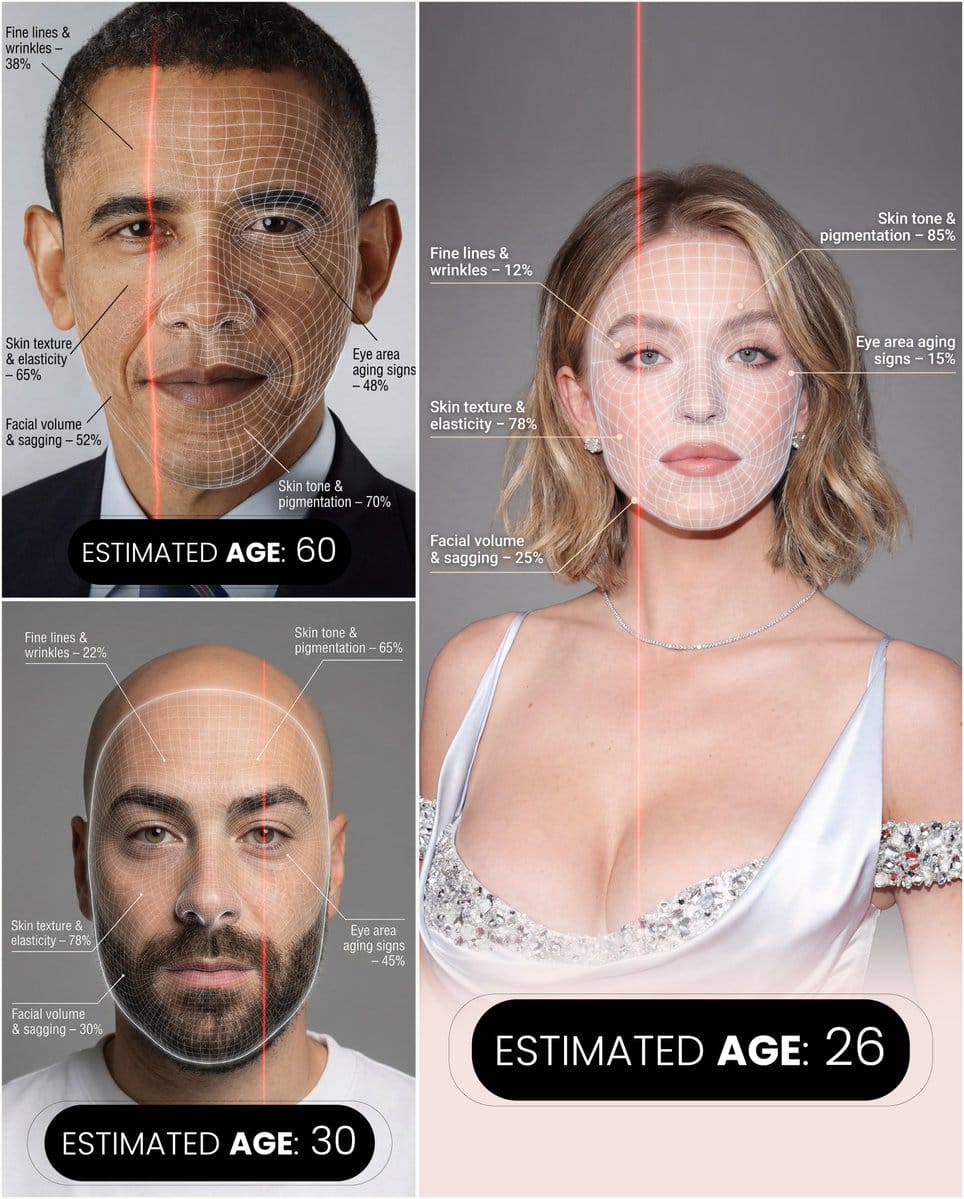
Futuristic facial age-checker infographic portrait

A long, detailed prompt for creating a hyper-realistic portrait infographic that analyzes facial aging factors with overlays and labeled percentages, styled like a premium cosmetic-tech ad.

Indicación de ejemplo
A hyper-realistic, high-resolution portrait infographic based on ({argument name="reference_photo_en" default="your photo"}). Keep the same person, identity, hairstyle, clothing, and natural skin tone from ({argument name="reference_photo_short_en" default="your photo"}), with a neutral studio background. Overlay a subtle, semi-transparent facial analysis grid over the entire face, similar to a 3D face-scanning mesh: thin, soft white lines following the facial contours, slightly glowing but not hiding the skin details. Add one clean vertical red laser line running down one side of the face, like a futuristic scan. All analysis lines must be soft, minimal, and elegant, exactly like a cosmetic-tech advertisement. Create a clean medical–aesthetic infographic that evaluates 5 aging factors using global data percentages: 1. Fine lines and wrinkles 2. Skin texture and elasticity 3. Facial volume and sagging 4. Eye area aging signs 5. Skin tone and pigmentation For each factor, place a small label with a thin line pointing to the relevant facial area, and next to it write a short title and a realistic percentage score from 0–100% (based on global data), for example: “Fine lines & wrinkles – 18%” “Skin texture & elasticity – 72%” “Facial volume & sagging – 35%” “Eye area aging signs – 41%” “Skin tone & pigmentation – 63%” Use clean, modern sans-serif typography and small technical-style text, like a scientific facial analysis UI. At the bottom of the image, in the center, write a large bold text showing the final estimated real age based on the analysis, for example: “ESTIMATED AGE: (random number based on face analysis)” Overall style: futuristic AI-guided skincare analysis, minimalistic, premium editorial lighting, no gender specified, suitable for any human face.
Generar con IA
Modelo de IA
Nano-banana-pro
Autor

Preguntas frecuentes

Todo lo que necesitas saber sobre indicaciones de character style

¿Cómo uso esta indicación de character style?

Simplemente haz clic en el botón "Generar con IA" arriba, y serás llevado a nuestro generador de imágenes con IA con esta indicación de Character Style pre-llenada. Puedes personalizarla más o generar imágenes directamente. Nuestra IA interpretará la indicación y creará impresionantes visuales de character basados en tu descripción.

¿Puedo modificar esta indicación para mis necesidades específicas?

¡Por supuesto! Siéntete libre de copiar la indicación y personalizarla para que coincida con tu visión. Para obras de arte de character, intenta añadir detalles sobre estilo, iluminación, composición o ambiente. Cuanto más descriptivo seas, mejor podrá la IA entender tu visión creativa. Explora nuestras indicaciones de character para aprender más técnicas.

¿Qué modelos de IA funcionan mejor para character style?

Esta indicación de character funciona con la mayoría de los generadores de imágenes de IA modernos, incluyendo Nano Banana, Flux y GPT-Image. Diferentes modelos sobresalen en diferentes aspectos - Nano Banana es excelente para estilos character, mientras que Flux ofrece resultados fotorrealistas.

¿Qué hace una buena indicación de character style?

Las grandes indicaciones de character incluyen: detalles específicos del sujeto, referencias de estilo artístico, condiciones de iluminación (luz suave, sombras dramáticas), paleta de colores, ambiente/atmósfera y especificaciones técnicas (4K, detallado, HD). Estudia nuestras indicaciones de ejemplo para ver patrones efectivos.

¿Esta indicación es gratuita?

¡Sí! Todas las indicaciones en nuestra biblioteca son completamente gratuitas para uso personal y comercial. Copia, modifica y crea increíbles obras de arte de character sin restricciones.

More Prompts ➜
Whiteboard-style simple diagram from text - AI Image Prompt
Whiteboard-style simple diagram from text
A prompt that turns a text into a clean 16:9 whiteboard-style diagram with central concept, arrows, and highlighted key points.
by かずりりぃ|ChatGPT,AI 活用×SNS発信の裏技
Connected series of four-panel manga strips - AI Image Prompt
Connected series of four-panel manga strips
A meta-structural prompt (not fully quoted) that instructs Nano Banana Pro to create multiple four-panel comics, each with its own punchline, and connect them into a longer story on a single image.
by 美咲
Cinematic taxi in rainy Kabukicho at night - AI Image Prompt
Cinematic taxi in rainy Kabukicho at night
A Japanese prompt describing a taxi stopped on Yasukuni-dori in front of Kabukicho Ichibangai on a rainy night, shot from a front oblique cinematic angle.
by UMINEKO STUDIO
Opposite camera view of anime girl by the river - AI Image Prompt
Opposite camera view of anime girl by the river
A prompt for changing the camera angle to view an existing character from behind while maintaining pose and scene consistency.
by B.M. Cifer
Professor explaining content on a whiteboard - AI Image Prompt
Professor explaining content on a whiteboard
A reusable ‘whiteboard prompt’ that turns pasted text into an image of a professor explaining the core ideas on a whiteboard with diagrams, arrows, boxes, captions, and color.
by てる@プロンプトマフィア
Infographic of programming language evolution - AI Image Prompt
Infographic of programming language evolution
A very minimal Spanish prompt asking for an infographic about the evolution of programming languages, suitable for educational visuals.
by Brais Moure

¿Listo para crear imágenes increíbles?

Empieza a generar impresionantes imágenes con IA usando esta indicación o explora nuestra extensa biblioteca de indicaciones para más inspiración.

Generar ahora Explorar todas las indicaciones



