
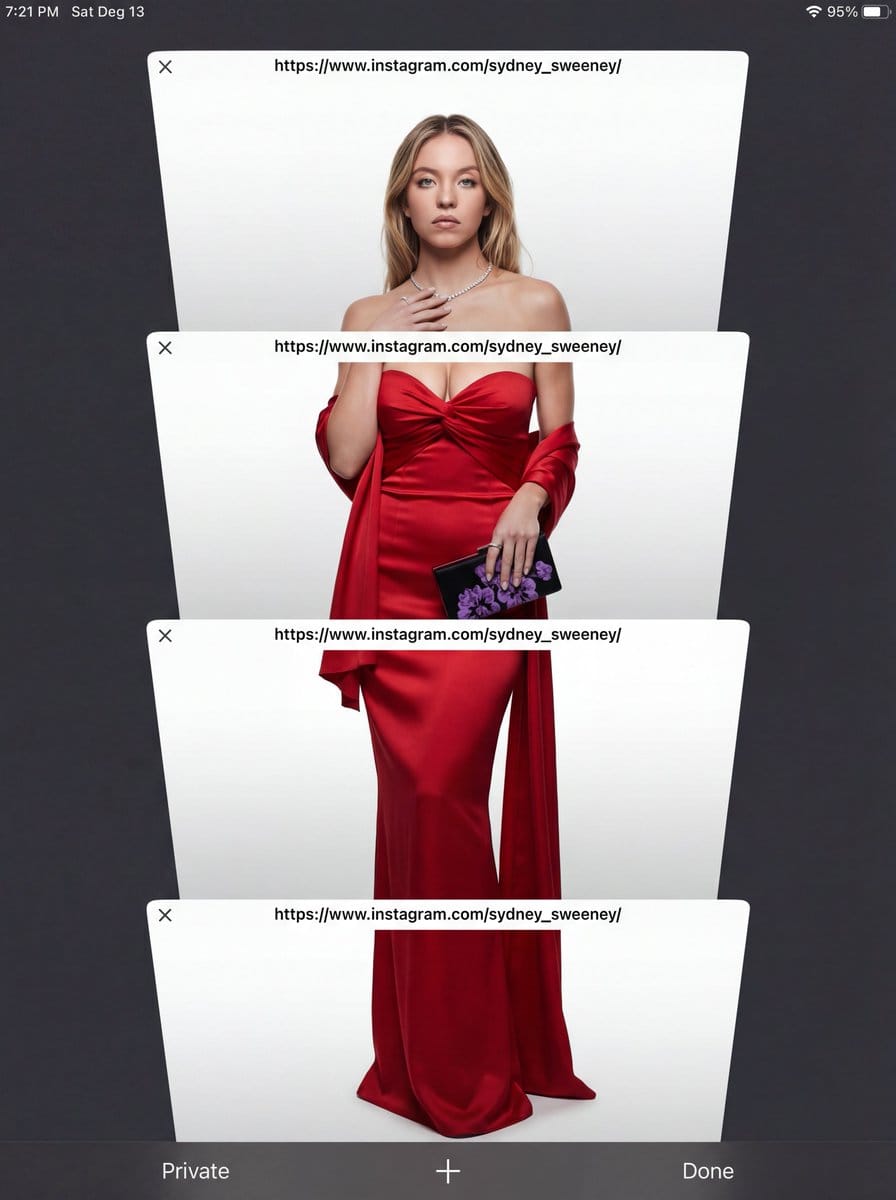
E-commerce Studio Portrait with UI Overlay - AI Generated Character Style Image
Generar imagen similar

This prompt is optimized for Nano-banana-pro model

E-commerce Studio Portrait with UI Overlay

A complex, multi-layered prompt designed to generate a high-contrast, three-dimensional studio portrait overlaid with a simulated mobile phone browser interface. It specifies volumetric studio lighting to sculpt the subject sharply against a flat backgrou

Indicación de ejemplo
Subject Reference: A full-body portrait of [INSERT SUBJECT NAME]. Scene Description: A full-body, centered portrait of the subject [INSERT POSE DESCRIPTION]. The subject has [INSERT EXPRESSION], staring directly at the camera. The immediate background behind the subject is a [INSERT BACKGROUND TYPE, e.g., seamless, pure high-key white studio backdrop]. Crucially, the subject is lit with volumetric studio lighting that creates deep definitions, realistic shadows, and a strong 3D quality on her body and the folds of the outfit, distinguishing her sharply from the flat background without casting shadows on the floor. CRITICAL DETAIL (UI Layer): The entire photographic image is digitally layered beneath a simulated mobile phone browser interface overlay. Four distinct, clean, white, rectangular browser window elements are stacked vertically and angled slightly, segmenting the subject. Each window bar contains the sharp text '[INSERT LINK OR TEXT HERE]'. The area outside the active white browser windows is a solid, uniform, dark charcoal gray/black matte UI frame, with absolutely no light bleed or color gradients. Style: Hybrid Composition: A highly realistic, three-dimensional studio photograph with deep color depth, overlaid with flat, clean digital graphics. Lighting Quality: Specific volumetric studio lighting focused ONLY on the subject. Soft, directional light from slightly off-center to sculpt the body and the rich texture of the fabric, creating depth. The background must remain completely flat. Color Palette: High contrast. {argument name="outfit color" default="[INSERT OUTFIT COLOR]"} outfit against {argument name="background color" default="[INSERT BACKGROUND COLOR]"} backdrop, framed by the dark matte gray UI. Texture and Mood: Realistic skin and rich fabric texture contrasting with the smooth digital elements of the UI. Intentional inclusion of subtle digital noise/grain to mimic a screen capture. Full body, centered portrait. Ensure the head and feet are fully within the frame before segmentation. Angle: Straight eye-level view, perpendicular to the subject. Framing Elements: Four overlapping, white browser windows/tabs. The pose is elegant and fluid. The bottom interface elements (e.g., 'Private', 'Done') must be clean and visible. Focal Length: Standard portrait lens (approx. 50mm equivalent) for realistic proportions. Camera Type: Simulated high-quality smartphone screen capture of a professional photo. Depth of Field: Shallow enough to focus sharply on the subject, allowing the background to be soft. Post Processing: Clean digital segmentation. Contrast adjusted to enhance depth. Avoid Keywords: Floor shadows, flat lighting, 2D look, inconsistent UI color, bleeding colors, HDR, oversharpened. Location: Simulated E-commerce studio ({argument name="background type" default="[INSERT BACKGROUND TYPE]"}).
Generar con IA

Pro Tip:

This character style prompt has been tested and optimized for best results. You can modify it slightly to customize the output while keeping the core structure intact.

Modelo de IA
Nano-banana-pro
Autor
Category
Character Style

Preguntas frecuentes

Todo lo que necesitas saber sobre indicaciones de character style

¿Cómo uso esta indicación de character style?

Simplemente haz clic en el botón "Generar con IA" arriba, y serás llevado a nuestro generador de imágenes con IA con esta indicación de Character Style pre-llenada. Puedes personalizarla más o generar imágenes directamente. Nuestra IA interpretará la indicación y creará impresionantes visuales de character basados en tu descripción.

¿Puedo modificar esta indicación para mis necesidades específicas?

¡Por supuesto! Siéntete libre de copiar la indicación y personalizarla para que coincida con tu visión. Para obras de arte de character, intenta añadir detalles sobre estilo, iluminación, composición o ambiente. Cuanto más descriptivo seas, mejor podrá la IA entender tu visión creativa. Explora nuestras indicaciones de character para aprender más técnicas.

¿Qué modelos de IA funcionan mejor para character style?

Esta indicación de character funciona con la mayoría de los generadores de imágenes de IA modernos, incluyendo Nano Banana, Flux y GPT-Image. Diferentes modelos sobresalen en diferentes aspectos - Nano Banana es excelente para estilos character, mientras que Flux ofrece resultados fotorrealistas.

¿Qué hace una buena indicación de character style?

Las grandes indicaciones de character incluyen: detalles específicos del sujeto, referencias de estilo artístico, condiciones de iluminación (luz suave, sombras dramáticas), paleta de colores, ambiente/atmósfera y especificaciones técnicas (4K, detallado, HD). Estudia nuestras indicaciones de ejemplo para ver patrones efectivos.

¿Esta indicación es gratuita?

¡Sí! Todas las indicaciones en nuestra biblioteca son completamente gratuitas para uso personal y comercial. Copia, modifica y crea increíbles obras de arte de character sin restricciones.

¿Listo para crear imágenes increíbles?

Empieza a generar impresionantes imágenes con IA usando esta indicación o explora nuestra extensa biblioteca de indicaciones para más inspiración.



