
Compilation of 18 Nano Banana Pro Prompts (Tennen's Prompt Festival) - AI Generated Pixel art Style Image
Generar imagen similar

This prompt is optimized for Nano-banana-pro model

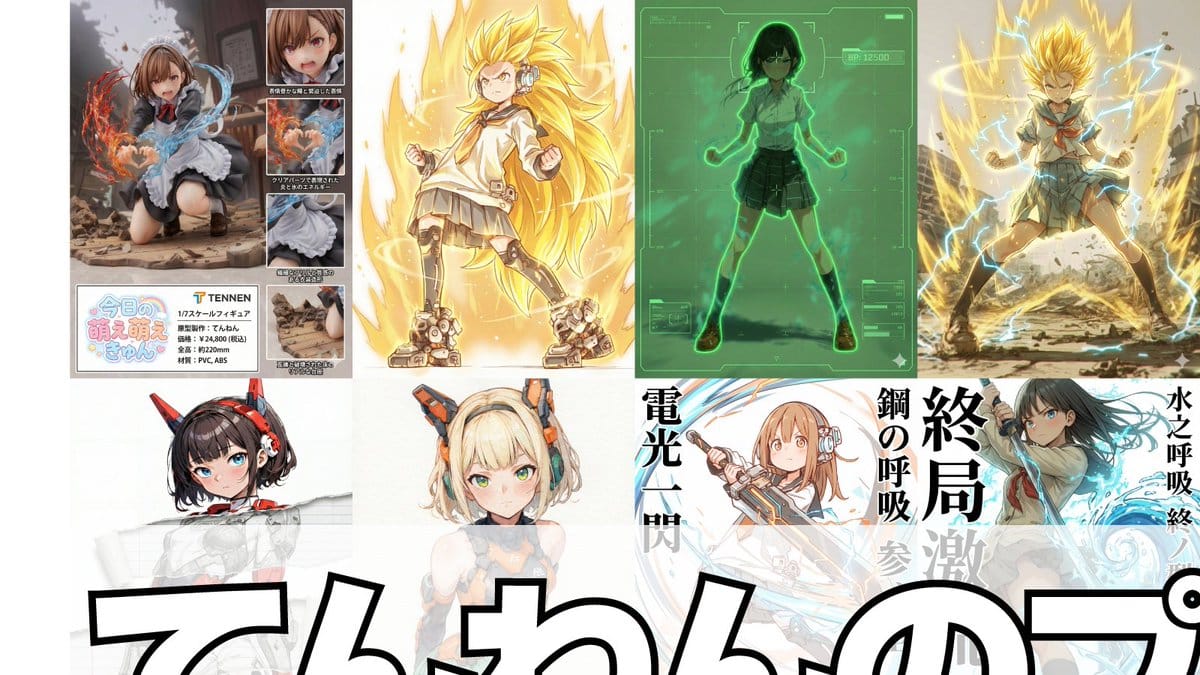
Compilation of 18 Nano Banana Pro Prompts (Tennen's Prompt Festival)

A comprehensive list of 18 specialized Nano Banana Pro prompts created by the user 'Tennen,' covering various use cases from adding Scouters and 'Super Transformation' effects to generating retro RPG status screens, figure product layouts, and special mov

Indicación de ejemplo
1. Scouter Prompt Overlays a Scouter-style UI onto the reference image and infers and displays the combat power based on the character's features. 2. Super Transformation Prompt Maintains the character features from the reference image and changes the pose to an 'Awakening Pose' to 'Super Transform' them. 'Super Transformation' can be selected from Form 1 to Form 3, as well as God Form, Blue Form, Extreme Form, and Rose Form. 3. Field Deployment Prompt Changes the character in the reference image to a pose with hands extended forward and deploys a field. 4. Retro RPG Status Screen Prompt A prompt that converts the character in the reference image into pixel art and generates an image styled like a retro RPG status screen. 5. Desktop Mascot Prompt A prompt that generates an image of the character from the reference image turned into a desktop mascot and placed on a PC screen. 6. Style Change Only on Torn Parts Prompt Adds a tearing effect without changing the reference image itself, allowing the art style of only the torn part to be freely switched to line art, ink painting, figure style, colored pencil, watercolor, pencil drawing, etc. 7. Art Style Conversion Prompt A prompt created by modifying the 'Style Change Only on Torn Parts Prompt' to change the overall art style. 8. Super Robot Wars Battle Sequence Prompt A prompt that generates an image styled like a Super Robot Wars battle sequence from the reference image. 9. Power Release Prompt A prompt that reproduces the depiction of a spherical energy space destroying an object. 10. Participation Screen Prompt A prompt that generates a 'Participation Screen' for the character in the reference image. 11. Total Concentration Prompt Maintains the character from the reference image and infers and depicts 'Weapon, Breathing Style, Form, and Move Name' from the character's atmosphere and stance. 12. Kamehameha Style Prompt A prompt that can stably generate the charging pose and activation pose of 'Kamehameha.' 13. Figure Transformation + Product Introduction Layout Prompt A prompt that transforms the character in the reference image into a figure and lays it out in a product introduction style. 14. Final Flash Style Prompt Converts the character in the reference image into the activation, charging, and firing poses of 'Final Flash.' Dialogue and sound effects can be added to each. 15. New Profile Image Generation Prompt Generates the character from the reference image in an arbitrary aspect ratio and places an arbitrary string as a logo in an arbitrary position. 16. Plastic Model Package Prompt Generates an image styled like a 'Plastic Model Package' by placing the reference image on the front and side. 17. Eraser Gun Style Prompt The character in the reference image emits an Eraser Gun-style energy wave from their mouth. 18. Ragged Transformation Prompt A prompt that transforms the character in the reference image into 'rags.'
Generar con IA

Pro Tip:

This pixel art style prompt has been tested and optimized for best results. You can modify it slightly to customize the output while keeping the core structure intact.

Modelo de IA
Nano-banana-pro
Autor
Category
Pixel art Style

Preguntas frecuentes

Todo lo que necesitas saber sobre indicaciones de pixel art style

¿Cómo uso esta indicación de pixel art style?

Simplemente haz clic en el botón "Generar con IA" arriba, y serás llevado a nuestro generador de imágenes con IA con esta indicación de Pixel art Style pre-llenada. Puedes personalizarla más o generar imágenes directamente. Nuestra IA interpretará la indicación y creará impresionantes visuales de pixel art basados en tu descripción.

¿Puedo modificar esta indicación para mis necesidades específicas?

¡Por supuesto! Siéntete libre de copiar la indicación y personalizarla para que coincida con tu visión. Para obras de arte de pixel art, intenta añadir detalles sobre estilo, iluminación, composición o ambiente. Cuanto más descriptivo seas, mejor podrá la IA entender tu visión creativa. Explora nuestras indicaciones de pixel art para aprender más técnicas.

¿Qué modelos de IA funcionan mejor para pixel art style?

Esta indicación de pixel art funciona con la mayoría de los generadores de imágenes de IA modernos, incluyendo Nano Banana, Flux y GPT-Image. Diferentes modelos sobresalen en diferentes aspectos - Nano Banana es excelente para estilos pixel art, mientras que Flux ofrece resultados fotorrealistas.

¿Qué hace una buena indicación de pixel art style?

Las grandes indicaciones de pixel art incluyen: detalles específicos del sujeto, referencias de estilo artístico, condiciones de iluminación (luz suave, sombras dramáticas), paleta de colores, ambiente/atmósfera y especificaciones técnicas (4K, detallado, HD). Estudia nuestras indicaciones de ejemplo para ver patrones efectivos.

¿Esta indicación es gratuita?

¡Sí! Todas las indicaciones en nuestra biblioteca son completamente gratuitas para uso personal y comercial. Copia, modifica y crea increíbles obras de arte de pixel art sin restricciones.

¿Listo para crear imágenes increíbles?

Empieza a generar impresionantes imágenes con IA usando esta indicación o explora nuestra extensa biblioteca de indicaciones para más inspiración.



