
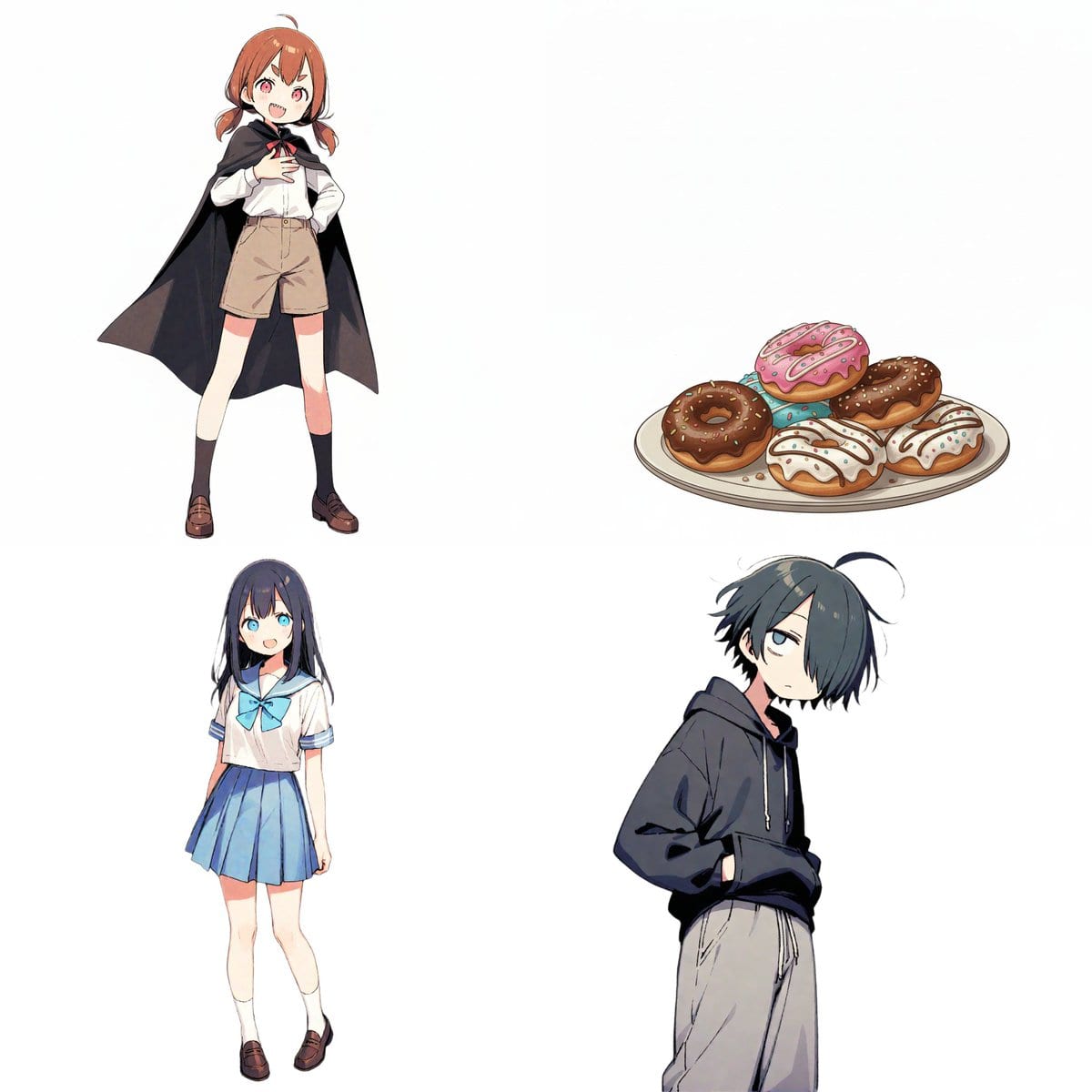
Character Relationship Chart Infographic

A detailed prompt template for Nano Banana Pro to generate a character relationship chart (相関図) infographic. It requires uploading character images and defining names, roles, and specific relationships, which are then visualized using color-coded arrows (

Indicación de ejemplo
# Instructions Refer to the attached image and create an illustration of a "Character Relationship Chart" based on the following requirements. # Production Style - A warm, hand-drawn BD anime illustration style, similar to the image. - White background. - Characters should be drawn and placed inside circular icons. # Character Settings *List the order and characteristics corresponding to the uploaded images. [Character A] - Name: {argument name="Character A Name" default="Tsuno-chan"} - Role: {argument name="Character A Role" default="Half-vampire"} [Character B] - Name: {argument name="Character B Name" default="Shiori-chan"} - Role: {argument name="Character B Role" default="Loves new things"} [Character C] - Name: {argument name="Character C Name" default="Kumao-kun"} - Role: {argument name="Character C Role" default="Always sleepy"} [Character D] - Name: {argument name="Character D Name" default="Donut"} - Role: {argument name="Character D Role" default="Donut"} (*Add more characters here if necessary) # Specific Relationship List from [A] to [B] : {argument name="Relationship A to B" default="Snack provider"} from [A] to [C] : {argument name="Relationship A to C" default="Minion No. 1"} from [A] to [D] : {argument name="Relationship A to D" default="Supreme item"} from [B] to [A] : {argument name="Relationship B to A" default="Love!"} from [B] to [D] : {argument name="Relationship B to D" default="Rival?"} from [C] to [A] : {argument name="Relationship C to A" default="Don't want to get involved"} from [C] to [B] : {argument name="Relationship C to B" default="Pitiful"} from [C] to [D] : {argument name="Relationship C to D" default="It's a donut..."} (*Add more relationships here if necessary) # Relationship and Arrow Rules (Important) Connect characters with arrows and strictly adhere to the following color-coding rules: - Positive relationships (like, admiration, cooperation, etc.) - Color: Red - Atmosphere: Warm colors, may include hearts or sparkles. - Negative relationships (dislike, hostility, nuisance, etc.) - Color: Blue - Atmosphere: Cold colors, may include jagged lines or cold sweat. # Output Notes - Arrange the layout in a balanced circular or hierarchical manner, even if the number of characters increases. - Write the name and role below each character icon. - Place the relationship description text near the arrow. - If a relationship is not set, the arrow and text are unnecessary. - Aspect ratio: 16:9
Generar con IA
Modelo de IA
Nano-banana-pro

Preguntas frecuentes

Todo lo que necesitas saber sobre indicaciones de character style

¿Cómo uso esta indicación de character style?

Simplemente haz clic en el botón "Generar con IA" arriba, y serás llevado a nuestro generador de imágenes con IA con esta indicación de Character Style pre-llenada. Puedes personalizarla más o generar imágenes directamente. Nuestra IA interpretará la indicación y creará impresionantes visuales de character basados en tu descripción.

¿Puedo modificar esta indicación para mis necesidades específicas?

¡Por supuesto! Siéntete libre de copiar la indicación y personalizarla para que coincida con tu visión. Para obras de arte de character, intenta añadir detalles sobre estilo, iluminación, composición o ambiente. Cuanto más descriptivo seas, mejor podrá la IA entender tu visión creativa. Explora nuestras indicaciones de character para aprender más técnicas.

¿Qué modelos de IA funcionan mejor para character style?

Esta indicación de character funciona con la mayoría de los generadores de imágenes de IA modernos, incluyendo Nano Banana, Flux y GPT-Image. Diferentes modelos sobresalen en diferentes aspectos - Nano Banana es excelente para estilos character, mientras que Flux ofrece resultados fotorrealistas.

¿Qué hace una buena indicación de character style?

Las grandes indicaciones de character incluyen: detalles específicos del sujeto, referencias de estilo artístico, condiciones de iluminación (luz suave, sombras dramáticas), paleta de colores, ambiente/atmósfera y especificaciones técnicas (4K, detallado, HD). Estudia nuestras indicaciones de ejemplo para ver patrones efectivos.

¿Esta indicación es gratuita?

¡Sí! Todas las indicaciones en nuestra biblioteca son completamente gratuitas para uso personal y comercial. Copia, modifica y crea increíbles obras de arte de character sin restricciones.

More Prompts ➜
Cute handwritten notes over a photo - AI Image Prompt
Cute handwritten notes over a photo
Asks Nano Banana Pro to overlay lots of cute handwritten annotations onto a photo, ideal for playful social posts or decorated snapshots.
by tahi
Chalkboard king rabbit illustration at sunset - AI Image Prompt
Chalkboard king rabbit illustration at sunset
Creates a classroom chalkboard artwork of a rabbit king with Japanese text, in a real classroom scene with sunset light coming through the window from an oblique angle.
by さつき@AIお絵描き(うさぎ好き)
Essay-style manga about a family trip to Universal Studios - AI Image Prompt
Essay-style manga about a family trip to Universal Studios
A prompt that turns a personal anecdote into an essay-style manga where a family plans a trip to Universal Studios and is surprised by the ticket pricing for their child.
by みちぽ|Xの先生
Einstein teaching at MIT with Hindi joke text - AI Image Prompt
Einstein teaching at MIT with Hindi joke text
A detailed prompt for a realistic classroom scene of Einstein at an MIT chalkboard, with a playful Devanagari sentence written clearly on the board.
by neural nets.
Translate a manga into Japanese and re-render as image - AI Image Prompt
Translate a manga into Japanese and re-render as image
A simple prompt that asks Nano Banana Pro to translate a manga into Japanese and output it as an image with the translated text.
by 石川陽太 Yota Ishikawa
Expression Transformation: Crying While Smiling - AI Image Prompt
Expression Transformation: Crying While Smiling
A prompt designed to test the consistency and expression transformation capabilities of image models. It requests transforming a character's expression to 'crying while smiling'—specifically, tears streaming down cheeks while maintaining a gentle, bitters
by Ryo@AI動画×AIツール紹介

¿Listo para crear imágenes increíbles?

Empieza a generar impresionantes imágenes con IA usando esta indicación o explora nuestra extensa biblioteca de indicaciones para más inspiración.

Generar ahora Explorar todas las indicaciones



